
Recruiting today is not just about finding candidates.
You also need to manage outreach, follow-ups, interviews, and pipeline updates without losing speed or candidate quality. That is exactly where platforms like Recruiterflow position themselves for recruiting agencies and staffing teams.
But is Recruiterflow actually worth the investment for modern recruiters?
In this guide, you will learn:
- Recruiterflow features and recruiting workflows
- Pricing plans, hidden costs, and scalability
- User experience, automation, and ease of use
- ROI breakdown for recruiters and agencies
- Whether Leelu AI is a better alternative for faster hiring workflows
What Is Recruiterflow and Who Is It Built For?
As recruiting becomes more competitive, agencies need more than a basic ATS to manage hiring workflows efficiently.
That is where Recruiterflow positions itself as a recruitment CRM and ATS platform designed mainly for staffing agencies, executive search firms, and modern recruiting teams.
Recruiterflow helps recruiters manage candidate sourcing, outreach, pipeline tracking, interview coordination, and client relationships from one centralized platform.
Instead of switching between spreadsheets, emails, and disconnected tools, recruiters can handle most hiring activities in a single workflow.
1. Types of Teams and Agencies That Use Recruiterflow
Recruiterflow is commonly used by:
- Staffing and recruiting agencies
- Executive search firms
- Boutique recruiting teams
- Solo recruiters and consultants
- High-volume hiring agencies
- Technical and healthcare recruiting firms
The platform is especially useful for teams that manage both candidate relationships and client communication together.
2. Core Hiring Workflows Recruiterflow Helps Manage
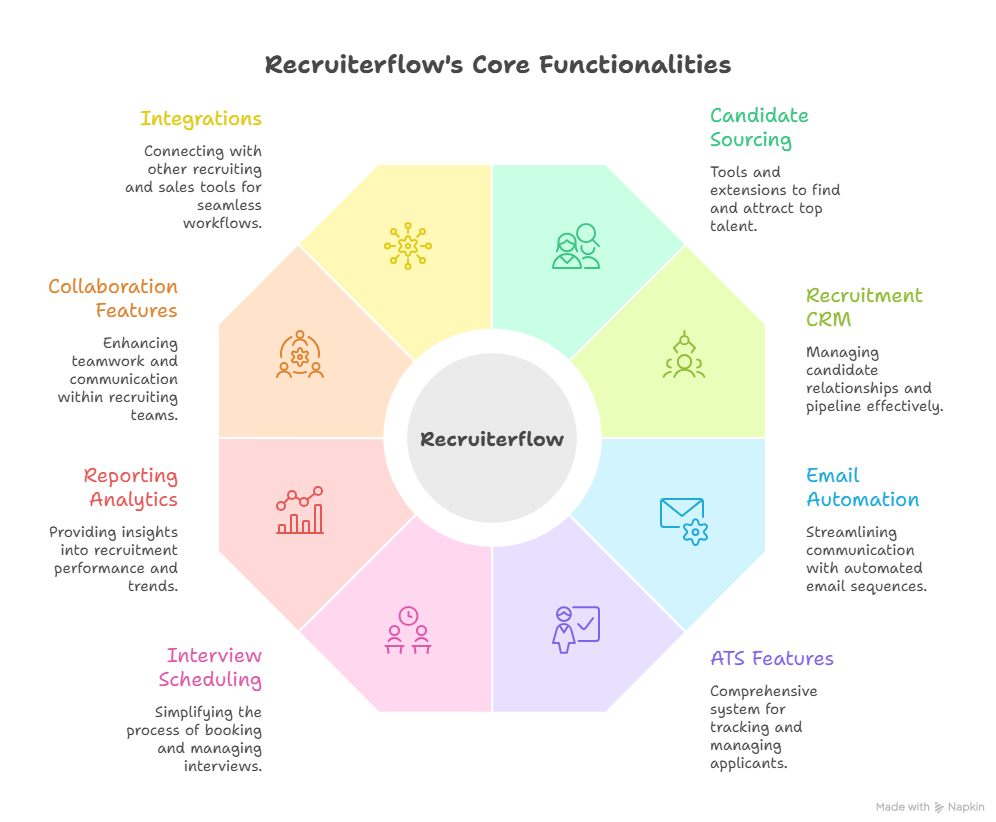
Recruiterflow focuses on simplifying day-to-day recruiting operations through automation and workflow management. Key workflows include:
- Candidate sourcing and outreach
- Recruitment pipeline tracking
- Resume management and ATS workflows
- Email automation and follow-ups
- Interview scheduling and collaboration
- Client and candidate relationship management
The goal is to reduce manual recruiter work while improving hiring speed and organization.
Recruiterflow Features Breakdown
One of the biggest reasons recruiting agencies consider Recruiterflow is its attempt to combine ATS, CRM, automation, and communication tools into one platform.
Instead of managing separate recruiting systems, Recruiterflow focuses on creating a centralized workflow for recruiters and staffing teams.
1. Candidate Sourcing and Chrome Extension
Recruiterflow includes a Chrome extension that helps recruiters source candidates directly from platforms like LinkedIn.
Recruiters can quickly import candidate profiles, resumes, contact information, and activity history into the platform without manual data entry.
This makes sourcing faster for agencies handling large candidate volumes daily. The extension also helps reduce repetitive administrative work during talent searches.
2. Recruitment CRM and Pipeline Management
Recruiterflow combines recruitment CRM functionality with pipeline management features.
Recruiters can track candidate stages, client communication, job openings, and hiring progress from a visual pipeline dashboard.
This is especially useful for agencies managing multiple clients and active hiring roles simultaneously. Teams can organize candidates based on hiring stages and monitor recruiter activity more efficiently.
3. Email Sequences and Recruiting Automation
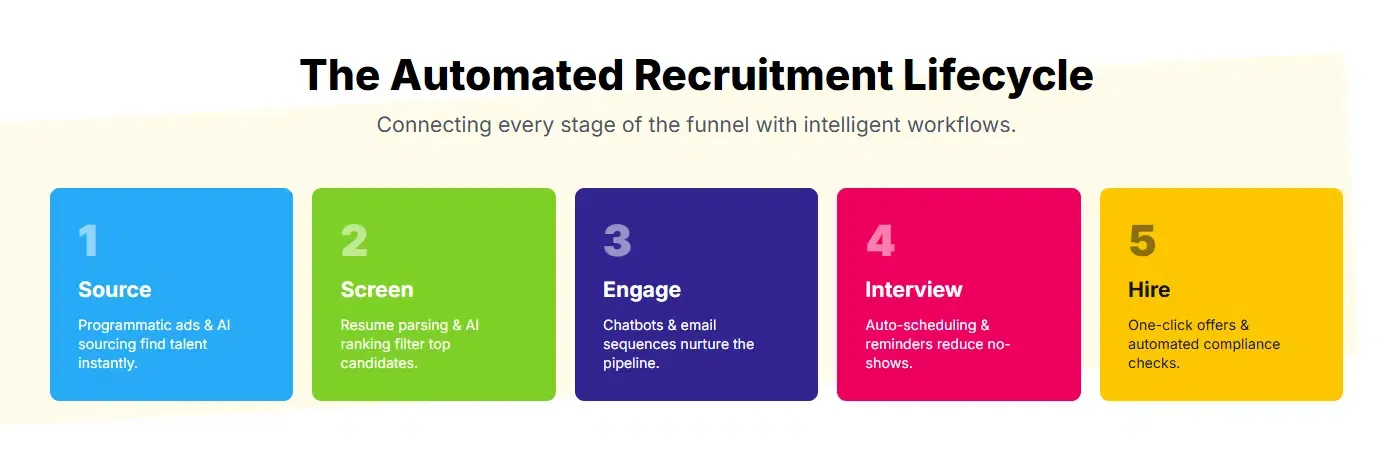
Recruiterflow offers built-in email automation for candidate outreach and follow-ups.
Recruiters can create personalized email sequences, automate reminders, and schedule communication workflows for passive candidates.
This helps agencies maintain candidate engagement without manually sending every message. Automation can also reduce delays in follow-ups, which often impacts response rates during recruiting campaigns.
4. Applicant Tracking System (ATS) Features
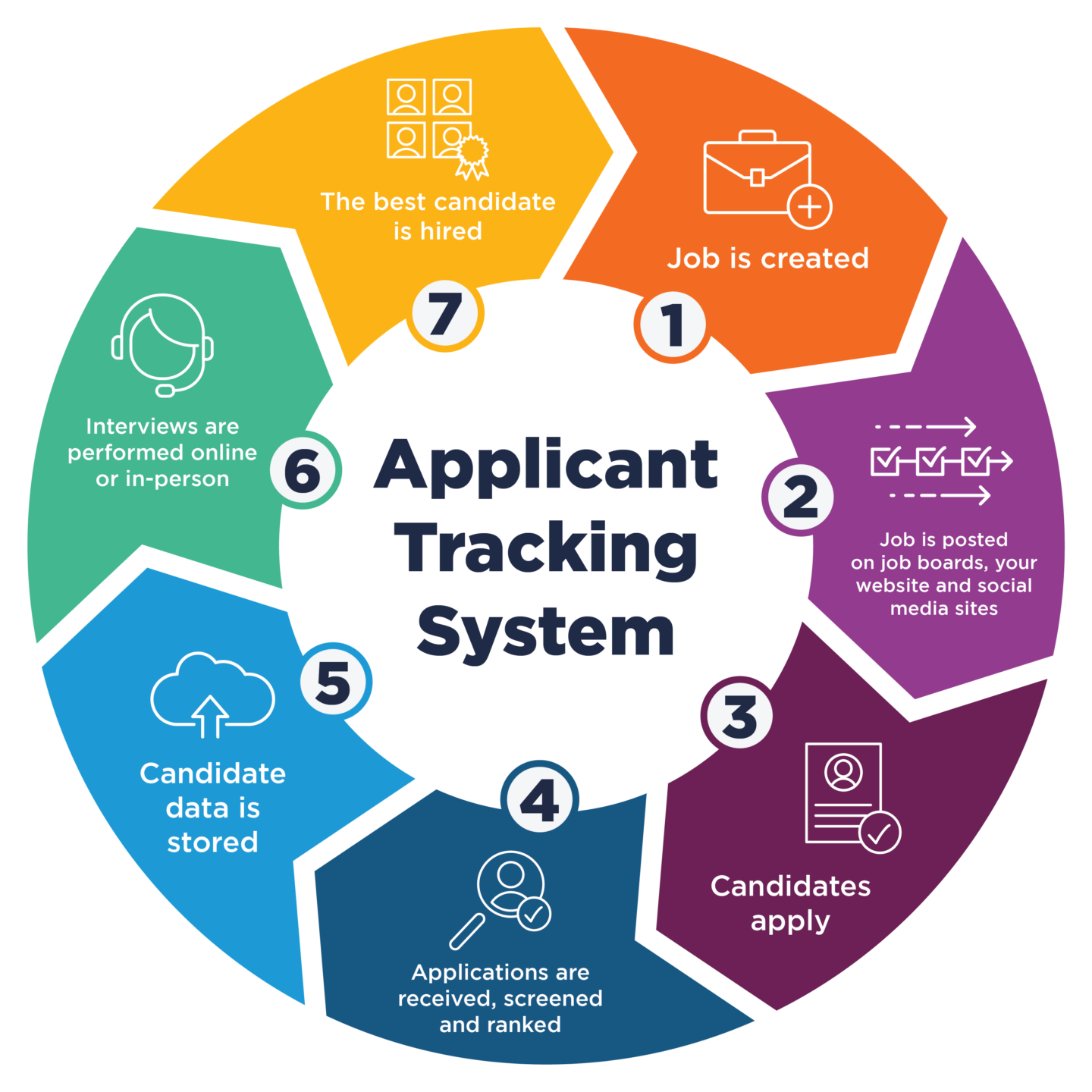
At its core, Recruiterflow functions as an ATS platform for managing applicants and hiring workflows.
Recruiters can store resumes, manage applications, track interview stages, and maintain candidate records inside one system.
The platform also supports resume parsing and candidate tagging, making it easier to search and filter talent pipelines later.
For agencies dealing with high application volumes, these ATS capabilities help improve organization and reduce workflow confusion.
5. Interview Scheduling and Calendar Sync
Interview coordination is another feature Recruiterflow attempts to simplify.
The platform supports calendar syncing and interview scheduling integrations that help recruiters coordinate meetings faster with candidates and hiring managers.
This reduces back-and-forth communication and minimizes scheduling conflicts across recruiting teams.
6. Reporting and Recruiting Analytics
Recruiterflow includes analytics dashboards that help agencies track recruiting performance and pipeline activity.
Recruiters can monitor metrics like placements, outreach performance, hiring stages, recruiter productivity, and client activity.
These reporting features are useful for agencies that rely heavily on performance tracking and operational visibility.
7. Collaboration Features for Recruiting Teams
For multi-user recruiting agencies, Recruiterflow offers collaboration features designed for shared hiring workflows.
Recruiters can leave notes, assign tasks, share candidate feedback, and collaborate across teams inside the platform.
This creates better visibility across hiring processes, especially when multiple recruiters are involved in the same client account or job role.
8. Integrations With Recruiting and Sales Tools
Recruiterflow also supports integrations with several recruiting and productivity tools.
This includes email platforms, calendars, communication software, and some ATS-related integrations.
The goal is to reduce workflow fragmentation and help recruiters connect their existing hiring stack without constantly switching systems.
However, some advanced integrations and automation capabilities may depend on higher-tier pricing plans or external tools.
Suggested Reading:
9 AI Recruiting Tools That Replace Manual Hiring WorkflowsRecruiterflow Pricing Explained
Pricing is one of the biggest factors recruiting agencies evaluate before switching to a new ATS or recruitment CRM.
While Recruiterflow positions itself as an all-in-one recruiting platform, the overall cost depends heavily on team size, required automation features, and AI functionality.
1. Recruiterflow Pricing Plans Overview
Recruiterflow currently offers two main pricing options:
- Platform Plan
- AIRA Plan (custom pricing)
The standard Platform Plan starts around $149 per user per month based on the latest pricing page. Earlier pricing pages and review platforms showed lower entry pricing between $99–$129 per user monthly, suggesting Recruiterflow has gradually increased pricing over time.
The AIRA Plan does not display public pricing and requires contacting sales for a custom quote. This plan is designed for larger recruiting agencies looking for AI-powered recruiting automation features.
2. What Is Included in Each Plan
The Platform Plan includes core recruiting functionality such as:
- ATS and recruitment CRM
- Chrome sourcing extension
- Recruitment automation
- Multichannel email sequences
- Sales automation workflows
- Basic reporting and analytics
- API access
- Client and recruiter access controls
However, some advanced AI capabilities are reserved for the AIRA Plan only. These include:
- AI notetaker and summaries
- AI candidate matching
- Job change alerts
- Omnichannel communication sync
- Advanced BI dashboards
- AI workflow agents and enrichment tools
This means smaller agencies using the base plan may not get access to Recruiterflow’s newer AI-focused functionality.
3. Hidden Costs and Add-Ons to Consider
Recruiterflow states there are “no add-ons” or surprise charges within selected plans. However, there are still potential indirect costs agencies should evaluate carefully.
For example:
- White-glove data migration is paid separately
- Advanced AI features require custom pricing tiers
- Scaling costs rise quickly with larger recruiting teams
- Some integrations may require external software subscriptions
For smaller agencies, the per-user pricing model can become expensive as recruiter headcount grows.
4. Is Recruiterflow Expensive for Small Agencies?
For solo recruiters or boutique agencies, Recruiterflow sits in the mid-to-premium ATS pricing category compared to lower-cost recruiting tools.
A small 5-person recruiting team could easily spend thousands annually before additional migration or software costs.
That said, agencies that heavily rely on automation, CRM workflows, and recruiting outreach may still find the platform valuable if it improves placement speed and recruiter productivity.
Recruiterflow User Experience and Ease of Use
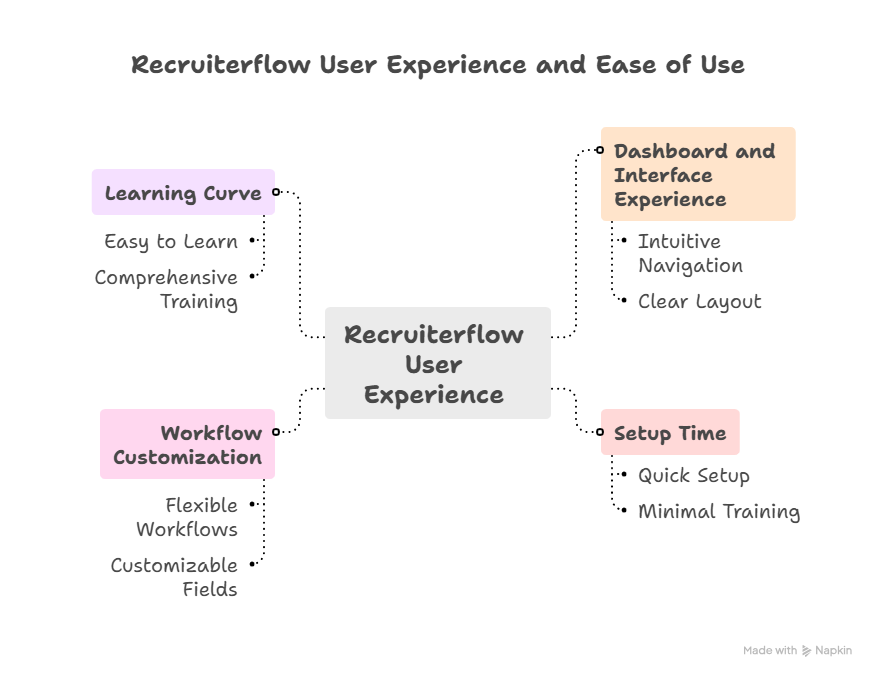
When recruiting teams adopt a new ATS or recruitment CRM, usability becomes just as important as features.
Even powerful recruiting software can slow teams down if the interface feels complicated or workflows take too long to learn. That is why many agencies evaluate Recruiterflow based on both functionality and day-to-day recruiter experience.
1. Dashboard and Interface Experience
Recruiterflow offers a modern and relatively clean interface compared to many older ATS platforms.
The dashboard is designed around recruiting workflows, making it easier for recruiters to access pipelines, candidate profiles, tasks, emails, and job openings from one place.
Pipeline views are visually organized, which helps agencies track hiring stages without relying heavily on spreadsheets or manual updates.
Most recruiters find the interface more intuitive than traditional enterprise ATS systems, especially for CRM-focused recruiting activities.
2. How Long It Takes to Set Up Recruiterflow
The setup process usually depends on team size, workflow complexity, and existing recruiting data.
Small recruiting agencies can typically get basic workflows running within a few days. However, larger staffing firms with custom processes, multiple users, and legacy ATS migration may require several weeks for full implementation.
Recruiterflow also provides onboarding and migration support, although advanced migration services may involve additional costs depending on the complexity of the setup.
3. Workflow Customization and Flexibility
One area where Recruiterflow performs well is workflow customization.
Recruiting teams can customize hiring stages, pipeline workflows, email templates, automation sequences, and recruiter permissions based on their hiring process.
This flexibility is useful for agencies managing different recruitment models across industries or clients.
However, some advanced automation and AI-driven workflows are tied to higher-tier plans, which may limit customization options for smaller teams using entry-level pricing.
4. Learning Curve for Recruiters and Agencies
For recruiters already familiar with ATS and CRM platforms, Recruiterflow generally has a manageable learning curve.
Most core workflows like sourcing, outreach, and candidate tracking are straightforward after initial onboarding.
That said, agencies using advanced automation, reporting, and workflow configurations may still need time to fully understand the platform’s capabilities.
New recruiters or non-technical users may also require training initially, especially when setting up automation-heavy recruiting processes.
Suggested Reading:
9 Recruitment Automation Tools That Save 70% Hiring TimeRecruiterflow ROI Breakdown
For most recruiting agencies, the real question is not whether an ATS has features.
The bigger question is whether the platform actually helps recruiters place candidates faster, reduce manual work, and improve recruiter productivity over time.
That is where ROI becomes important when evaluating Recruiterflow.
1. How Recruiterflow Can Save Recruiter Time
Recruiting agencies spend a huge amount of time on repetitive administrative work.
Tasks like updating pipelines, sending follow-ups, scheduling interviews, and organizing candidate records often consume hours every week.
Recruiterflow attempts to reduce that workload through automation and centralized workflows.
Features like automated email sequences, pipeline tracking, resume parsing, and workflow reminders help recruiters spend less time on manual coordination.
The Chrome extension also speeds up sourcing by allowing recruiters to import candidate data directly from LinkedIn and other sourcing platforms.
For agencies handling high hiring volumes, these workflow efficiencies can save recruiters several hours each week.
2. Impact on Candidate Outreach and Follow-Ups
One area where Recruiterflow delivers noticeable value is candidate communication management.
Recruiters often lose candidates simply because follow-ups are delayed or inconsistent.
Recruiterflow’s email automation and recruiting sequences help maintain regular outreach without requiring recruiters to manually track every conversation.
This can improve:
- Candidate response rates
- Follow-up consistency
- Recruiter productivity
- Outreach scalability
Instead of recruiters individually managing hundreds of conversations, automated workflows help standardize communication at scale.
However, personalization still depends heavily on recruiter input and messaging quality. The platform automates processes, but it does not fully replace recruiter engagement.
3. Does Recruiterflow Improve Placement Speed?
For many agencies, faster placements directly impact revenue and recruiter performance.
Recruiterflow helps streamline several hiring stages that typically slow agencies down, including sourcing, candidate tracking, communication, and interview coordination.
Because recruiters can manage workflows from a centralized system, there is generally less operational friction compared to using disconnected recruiting tools.
Automation also reduces delays in candidate movement between stages.
That said, placement speed improvements usually depend on how well agencies configure and use the platform internally.
Recruiterflow can improve operational efficiency, but recruiter execution, hiring demand, and candidate quality still play major roles in final placement timelines.
4. ROI for Solo Recruiters vs Large Recruiting Teams
The ROI experience can vary significantly depending on agency size.
For solo recruiters and small boutique firms, Recruiterflow may feel expensive initially because pricing is charged per user.
Smaller agencies may not fully utilize advanced automation features enough to justify higher annual software costs immediately.
However, recruiters handling multiple client accounts simultaneously may still benefit from workflow organization and outreach automation.
For larger recruiting agencies, the value proposition often becomes stronger.
Teams managing high candidate volumes and multiple recruiters can benefit more from:
- Shared pipelines
- Team collaboration tools
- Automated workflows
- Recruiting analytics
- CRM-based client management
In larger environments, even small productivity improvements across recruiters can generate significant operational ROI over time.
Recruiterflow Reviews and Customer Feedback
Before investing in recruiting software, agencies usually look at customer reviews to understand real-world usability and long-term reliability.
Across review platforms like G2, Capterra, and GetApp, Recruiterflow generally maintains a strong reputation among recruiting agencies and staffing firms.
1. What Users Like Most About Recruiterflow
Many users praise Recruiterflow for its modern interface and recruiting-focused workflow design.
Compared to older ATS systems, recruiters often describe the platform as easier to navigate and better optimized for agency recruiting.
Some of the most commonly appreciated features include:
- Recruitment CRM functionality
- Pipeline visibility
- Email automation
- Chrome sourcing extension
- Workflow organization
- Recruiting team collaboration
Users also frequently mention that Recruiterflow combines ATS and CRM functionality better than many traditional recruiting platforms.
This helps reduce the need for multiple disconnected recruiting tools.
2. Most Common Complaints and Frustrations
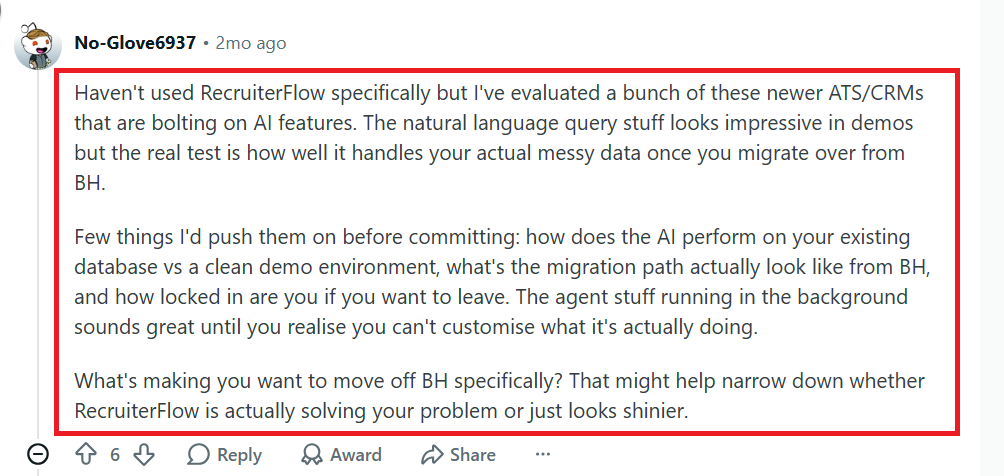
Some Reddit users mention that Recruiterflow’s automation workflows and AI features can become difficult to customize for real recruiting processes.
A few recruiters say the platform looks powerful initially, but managing automation logic with messy recruiting data becomes frustrating over time.
One discussion highlighting these concerns can be found here: Reddit Discussion on Recruiterflow AI and Automation Issues
3. Overall Market Reputation Across Review Platforms
Overall, Recruiterflow is widely viewed as a strong ATS and recruitment CRM option for staffing agencies and recruiting firms.
The platform is especially popular among modern recruiting teams looking for automation and CRM-focused workflows rather than traditional enterprise HR software.
Its reputation is strongest among agencies that prioritize candidate relationship management, recruiter collaboration, and outreach automation.
However, agencies looking for deep AI recruiting automation or lower-cost solutions may still compare Recruiterflow with newer AI-driven recruiting platforms before making a final decision.
Why Leelu AI is a Better Recruiterflow Alternative
While Recruiterflow focuses heavily on ATS and recruitment CRM workflows, Leelu AI is designed to automate the entire recruiting process using AI-driven hiring workflows.
Instead of only helping recruiters manage tasks, Leelu AI helps reduce the amount of manual recruiting work required from the start.
1. AI-Powered Candidate Sourcing Across Multiple Platforms
Leelu AI sources candidates from 500M+ profiles across LinkedIn, Indeed, Monster, ATS systems, and other recruiting platforms simultaneously.
This gives recruiters access to a much larger talent pool without manually switching between sourcing tools or databases.
2. Automated Screening and Candidate Matching
Leelu AI automatically parses resumes, screens candidates, and ranks profiles based on job fit using AI-powered matching algorithms.
Instead of manually reviewing hundreds of resumes, recruiters can identify high-fit candidates in minutes with better hiring accuracy and faster shortlisting.
3. Outreach and Follow-Ups Without Manual Work
Leelu AI also automates candidate outreach and follow-ups across multiple channels.
Recruiters can send personalized communication at scale while AI handles replies, follow-ups, and candidate engagement 24/7.
This helps reduce repetitive recruiter tasks while improving response consistency.
4. Faster Recruiting Workflows With End-to-End AI Automation
Unlike traditional recruiting platforms that mainly organize workflows, Leelu AI automates sourcing, screening, outreach, scheduling, and workflow updates end-to-end.
The result is faster hiring cycles, reduced recruiter workload, and a more scalable recruiting process for modern agencies and hiring teams.
Conclusion
Recruiterflow is a strong option for recruiting agencies that want a modern ATS with CRM capabilities, automation, and pipeline management in one platform.
It works especially well for staffing firms managing high candidate volumes and structured recruiting workflows.
However, agencies looking for deeper AI-driven automation may find newer platforms like Leelu AI more scalable for modern hiring needs.
The right choice ultimately depends on whether your team needs workflow management tools or fully automated recruiting workflows end-to-end.
Frequently Asked Questions
1. Is Recruiterflow good for small recruiting agencies?
Yes, Recruiterflow works well for small agencies needing ATS, CRM, and automation features in one recruiting platform.
2. Does Recruiterflow include recruiting automation features?
Yes, Recruiterflow offers email automation, follow-ups, workflow triggers, and candidate pipeline management for recruiting teams.
3. Can Recruiterflow help recruiters source candidates?
Recruiterflow includes sourcing tools and a Chrome extension that helps recruiters capture candidates directly from LinkedIn profiles.
4. Is Recruiterflow easy to learn for new recruiters?
Most recruiters find the platform user-friendly, though advanced automation and customization features may require additional onboarding time.
5. What are the biggest Recruiterflow limitations?
Some users mention pricing scalability, reporting limitations, and fewer AI-driven automation capabilities compared to newer recruiting platforms.


