You might have come across ATS and HRIS while setting up your hiring or HR processes, and at first, they can seem almost interchangeable.
But once you start using them, the differences become hard to ignore, especially when your workflows begin to overlap or break.
Understanding how each system works can help you avoid confusion and build a smoother HR stack.
In this guide, you will learn:
- What ATS and HRIS actually do
- Key differences between them
- When to use each system
What Is an ATS (Applicant Tracking System)?
When you start scaling hiring, managing candidates through emails and spreadsheets quickly becomes chaotic and hard to track.
That’s where an ATS steps in to bring structure, visibility, and control to your recruitment workflow.
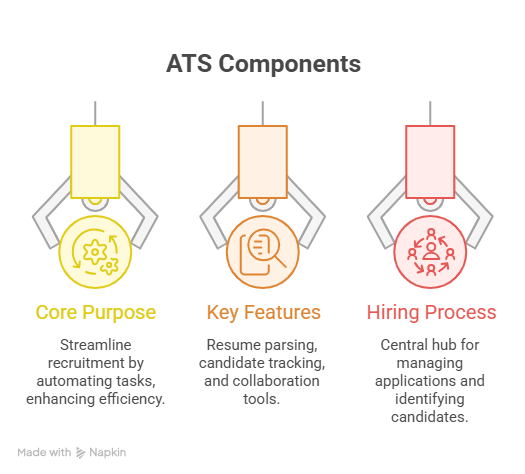
1. Core Purpose of an ATS
An Applicant Tracking System is designed to help you manage the entire hiring pipeline in one place.
Instead of juggling multiple tools, you can track every candidate from application to offer without losing context.
At its core, an ATS helps you:
- Organize candidate data in a centralized system
- Track progress across different hiring stages
- Streamline communication with applicants
- Reduce manual effort in recruitment tasks
It essentially acts as your hiring command center, ensuring nothing slips through the cracks.
2. Key Features of an ATS
Once you start using an ATS, you’ll notice how it simplifies repetitive hiring tasks while improving decision-making.
Most modern ATS platforms typically include:
- Resume parsing to automatically extract candidate details
- Candidate pipeline tracking with customizable stages
- Job posting across multiple platforms from one dashboard
- Automated email communication and follow-ups
- Interview scheduling and coordination tools
- Basic reporting and hiring analytics
These features help you move faster while keeping your hiring process structured and consistent.
3. Where ATS Fits in the Hiring Process
To understand its role better, think of your hiring process as a journey with clear stages.
An ATS primarily supports everything from the moment you open a role to the final hiring decision.
It is most actively used in:
- Job posting and application collection
- Candidate screening and shortlisting
- Interview coordination and feedback tracking
- Offer management and hiring decisions
Once a candidate is hired, the responsibility typically shifts to other HR systems like HRIS for employee management.
What Is an HRIS (Human Resource Information System)?
Once a candidate is hired, your focus naturally shifts from recruitment to managing them as an employee.
This is where an HRIS comes in, helping you handle everything that happens after onboarding begins.
1. Core Purpose of an HRIS
An HRIS is built to store, manage, and organize all employee-related information in one centralized system.
It helps you move from hiring mode to employee management without losing data or visibility.
At its core, an HRIS helps you:
- Maintain employee records and documentation
- Manage payroll, compensation, and benefits
- Track attendance, leaves, and working hours
- Ensure compliance with HR policies and regulations
It becomes your system of record for everything related to your workforce.
2. Key Features of an HRIS
As your team grows, manual HR operations can quickly become overwhelming and error-prone.
An HRIS simplifies this by automating routine processes and keeping everything structured.
Most HRIS platforms typically include:
- Employee database with complete profile history
- Payroll processing and salary management
- Leave and attendance tracking systems
- Benefits administration and compliance tracking
- Performance management and appraisal tools
- Employee self-service portals for updates and requests
These features help you reduce administrative overhead while improving accuracy and consistency.
3. Where HRIS Fits in the Employee Lifecycle
To see its role clearly, think beyond hiring and focus on long-term employee management.
An HRIS becomes active right after a candidate is officially onboarded into the company.
It is primarily used in:
- Employee onboarding and documentation
- Payroll, benefits, and compensation management
- Attendance, leave, and workforce tracking
- Performance reviews and employee development
- Offboarding and record maintenance
In simple terms, while an ATS helps you hire the right people, an HRIS helps you manage them effectively afterward.
Suggested Reading:
Types of HR Analytics That Drive Better Hiring & RetentionATS vs HRIS: 7 Key Differences Every HR Should Know
Now that you understand what both systems do individually, it becomes easier to see where they truly differ.
While they may seem similar at a glance, ATS and HRIS serve completely different purposes across your hiring and employee lifecycle.
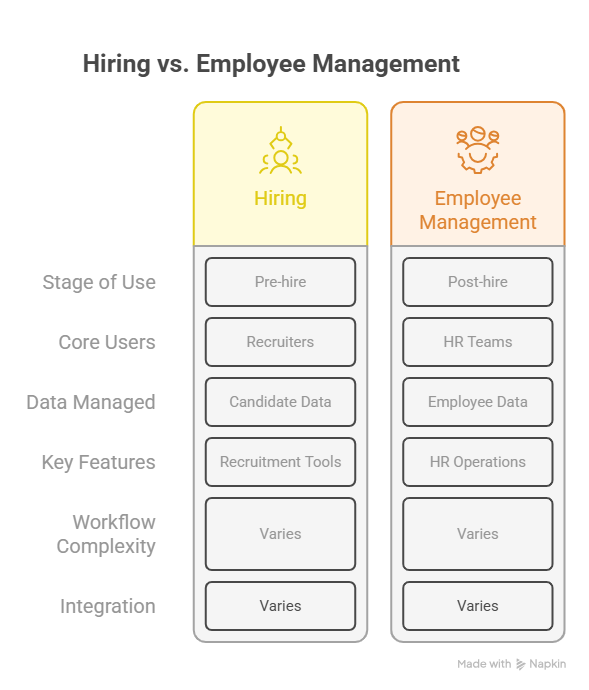
1. Focus Area: Hiring vs Employee Management
The biggest difference starts with what each system is built to handle.
An ATS focuses entirely on helping you attract, track, and hire candidates efficiently.
On the other hand, an HRIS is designed to manage employees after they are hired and support their day-to-day HR needs.
In simple terms, one helps you bring talent in, while the other helps you manage that talent long-term.
2. Stage of Use: Pre-hire vs Post-hire
If you map both systems to your hiring journey, they operate at completely different stages.
An ATS is used before a candidate becomes an employee, covering sourcing, screening, and interviews.
An HRIS comes into play after hiring, handling onboarding, payroll, and ongoing employee management.
This clear separation helps you avoid overlapping responsibilities between tools.
3. Core Users: Recruiters vs HR Teams
The people using these systems daily are also different, which shapes how each tool is built.
Recruiters and hiring managers primarily use an ATS to manage candidate pipelines and communication.
HR teams, payroll specialists, and operations managers rely on an HRIS for employee data and compliance.
So while both fall under HR tech, their users and workflows are not the same.
4. Data Managed: Candidate Data vs Employee Data
Another major difference lies in the type of data each system handles.
An ATS manages candidate information like resumes, applications, interview feedback, and hiring status.
An HRIS stores employee records such as personal details, salary, benefits, attendance, and performance data.
The transition from candidate data to employee data usually happens once a hire is finalized.
5. Key Features: Recruitment Tools vs HR Operations
The feature sets of both systems clearly reflect their purpose in your workflow.
An ATS includes tools for job posting, resume parsing, pipeline tracking, and interview scheduling.
An HRIS focuses on payroll, leave management, benefits administration, and performance tracking.
Each system is optimized for a completely different operational need.
6. Workflow Complexity and Automation
Both systems offer automation, but the type of workflows they handle is quite different.
An ATS automates hiring tasks like screening candidates, sending follow-up email, and scheduling interviews.
An HRIS automates operational processes such as payroll calculations, attendance tracking, and compliance reporting.
The complexity in ATS lies in managing high-volume hiring, while HRIS deals with ongoing employee operations.
7. Integration and System Dependencies
In most modern HR stacks, ATS and HRIS are not isolated systems but work together.
An ATS often integrates with an HRIS to transfer candidate data once a hire is confirmed.
This ensures a smooth handoff from recruitment to employee management without manual data entry.
In growing organizations, having both systems connected helps you build a seamless and efficient HR workflow.
Where Tools Like Leelu.ai Fit in ATS vs HRIS
Now that you’ve seen how ATS and HRIS operate in separate parts of the workflow, you might notice a gap in between.
This gap often shows up when sourcing, screening, and engaging candidates still require multiple tools and heavy manual effort.
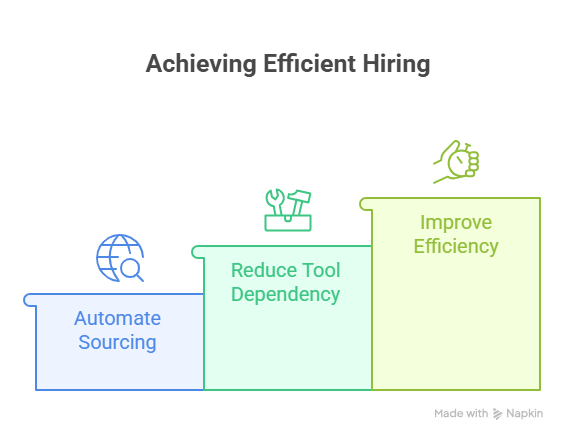
That’s exactly where tools like Leelu.AI start to make a difference.
1. Bridging gaps in the hiring process
Even with an ATS in place, a lot of the early hiring work still happens outside the system.
You might be switching between LinkedIn, job boards, spreadsheets, and outreach tools just to build a pipeline.
Leelu.ai fits right before and alongside your ATS, helping you streamline these fragmented steps into one flow.
Instead of replacing your ATS or HRIS, it connects the missing pieces in your hiring process.
2. Automating sourcing, screening, and outreach
One of the biggest bottlenecks in hiring is the time spent on repetitive tasks.
Sourcing candidates, reviewing profiles, sending messages, and following up can easily take hours every day.
Leelu.ai automates this entire layer by:
- Sourcing candidates from multiple platforms at once
- Resume Screening and ranking profiles based on job fit
- Sending personalized outreach at scale
- Handling follow-ups automatically
This means you spend less time on manual work and more time making actual hiring decisions.
3. Reducing dependency on multiple tools
When your hiring stack grows, it often becomes harder to manage than the hiring itself.
Using separate tools for sourcing, outreach, screening, and scheduling can create unnecessary complexity.
Leelu.ai helps reduce this tool overload by bringing these functions into a single workflow.
You no longer need to rely on disconnected systems just to move candidates through early stages.
4. Improving hiring speed and efficiency
At the end of the day, all these improvements lead to one key outcome: faster hiring.
By automating repetitive steps and centralizing workflows, you can move from job posting to interviews much quicker.
You also reduce delays caused by manual coordination and missed follow-ups.
The result is a smoother, more efficient hiring process that works seamlessly with your ATS and HRIS setup.
Suggested Reading:
How to Retain Gen Z Employees: 11 Proven Strategies That WorkWhen Should You Use an ATS vs HRIS?
At this point, the difference between ATS and HRIS is clear, but the real question is when you actually need each one.
The answer depends on where you are in your hiring and employee management journey.
1. When to choose an ATS
If your biggest challenge is attracting, tracking, and hiring candidates, an ATS is what you need first.
It helps you bring structure to your recruitment process and manage candidates without chaos.
You should consider an ATS when:
- You are actively hiring or scaling your team
- Candidate tracking is messy or spread across tools
- You need better visibility into your hiring pipeline
- Manual screening and coordination are slowing you down
An ATS becomes essential as soon as hiring volume starts increasing.
2. When to choose an HRIS
Once hiring is done, your focus shifts to managing employees efficiently.
This is where an HRIS becomes critical for handling day-to-day HR operations.
You should consider an HRIS when:
- You need a centralized employee database
- Payroll, attendance, and leave tracking are manual
- Compliance and documentation are becoming difficult to manage
- You want to streamline employee lifecycle management
An HRIS helps you maintain structure and consistency after onboarding.
3. When you need both
In most growing companies, it’s not about choosing one over the other.
You will eventually need both systems to support different parts of your workflow.
Using ATS and HRIS together makes sense when:
- You are hiring regularly while managing an existing team
- You want a seamless flow from candidate to employee data
- Manual data transfer between systems is causing delays
- You are building a scalable and efficient HR tech stack
When both systems are integrated properly, your hiring and HR operations work as one continuous process instead of disconnected steps.
Common Mistakes When Choosing Between ATS and HRIS
Even after understanding the differences, it’s easy to make the wrong decision when selecting between an ATS and HRIS.
These mistakes usually happen when you focus on tools instead of your actual workflow needs.
1. Choosing based on features instead of needs
It’s tempting to compare tools based on long feature lists and pick the one that looks more powerful.
But more features don’t always mean a better fit for your situation.
If your challenge is hiring, an HRIS with payroll features won’t solve your recruitment bottlenecks.
Similarly, an ATS won’t help much if your real issue is managing employee data and compliance.
The better approach is to map your current problems first, then choose the system that directly solves them.
2. Ignoring integration capabilities
Many teams choose tools in isolation without thinking about how they will work together later.
This often leads to data silos, manual data entry, and broken workflows.
For example, if your ATS cannot integrate with your HRIS, you may end up transferring candidate data manually after every hire.
Over time, this creates inefficiencies and increases the risk of errors.
Always check how well your tools integrate, especially if you plan to scale your HR tech stack.
3. Overlooking scalability
What works for a small team today may not work when your company starts growing.
Choosing a system without considering future needs can lead to costly migrations later.
You might outgrow your ATS when hiring volume increases or your HRIS when employee data becomes more complex.
It’s important to think a few steps ahead and choose tools that can grow with your business.
A scalable system ensures you don’t have to rebuild your HR processes every time your team expands.
Conclusion
Choosing between an ATS and HRIS becomes much simpler once you understand where each fits in your workflow.
An ATS helps you hire efficiently, while an HRIS ensures your employee operations run smoothly after onboarding.
Instead of viewing them as alternatives, it’s more practical to see them as complementary systems.
When used together, they create a seamless flow from candidate to employee, reducing manual work and improving overall efficiency.
The key is to align your choice with your current needs while keeping future growth in mind.
Frequently Asked Questions
1. Can small businesses use both ATS and HRIS, or is one enough?
Small businesses can start with one system based on their immediate needs. If hiring is frequent, an ATS helps more. If managing employees is the priority, an HRIS works better. As the company grows, using both together becomes more effective.
2. Is it difficult to migrate data from an ATS to an HRIS?
It depends on the tools you use. Many modern systems offer integrations or export/import options. However, poor data structure or lack of integration can make migration time-consuming.
3. Do ATS and HRIS systems require technical expertise to manage?
Most modern tools are designed to be user-friendly. Basic usage doesn’t require technical skills, but advanced customization, integrations, or reporting may need some technical support.
4. How long does it take to implement an ATS or HRIS?
Implementation time varies. An ATS can often be set up within a few days to weeks, while an HRIS may take longer due to payroll, compliance, and employee data setup.
5. Can ATS and HRIS systems support remote or global teams?
Yes, many systems support remote hiring and workforce management. Features like cloud access, multi-location tracking, and compliance tools make them suitable for distributed teams.