Hiring often slows down not because you lack candidates, but because communication takes too much manual effort.
From sending outreach emails to following up and scheduling interviews, small delays quickly pile up and stretch your hiring timeline.
That’s where recruiting email automation starts to make a real difference.
In this guide, you’ll learn:
- What recruiting email automation actually means
- How to set it up step by step
- Best practices to improve response rates and speed up hiring
Benefits of Recruiting Email Automation
Once you understand how recruiting email automation works, the next obvious question is — what actually changes for you when you start using it?
Because this is not just about sending emails faster, it’s about improving how your entire hiring process feels and performs.
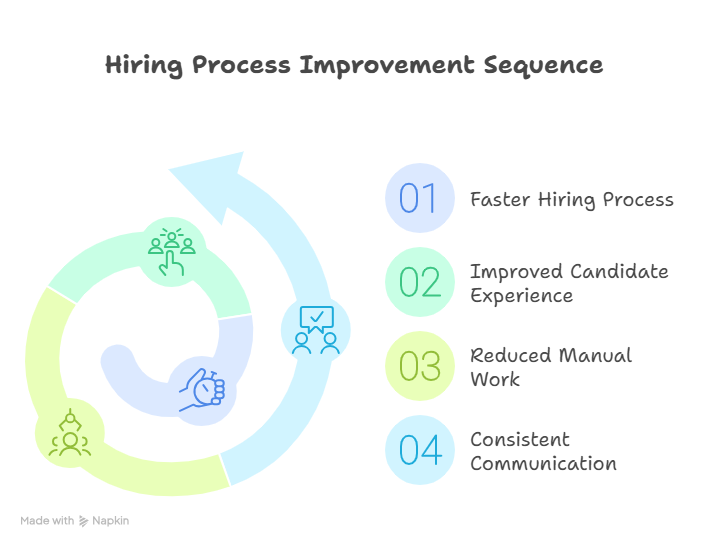
1. Faster Hiring Process
Hiring often slows down not because of lack of candidates, but because of delays in communication.
You send an email, wait for a response, forget to follow up, and suddenly days turn into weeks.
Recruiting email automation removes that lag by triggering emails instantly based on candidate actions or stages.
This means you can:
- Reach candidates the moment they apply
- Send follow-ups without waiting or remembering
- Move candidates to the next stage without delays
As a result, your time-to-hire shrinks significantly because the process keeps moving, even when you’re not actively managing it.
2. Improved Candidate Experience
From a candidate’s perspective, silence is the most frustrating part of any hiring process.
When they don’t hear back, they assume rejection or lose interest altogether.
With automation, every candidate gets timely updates, whether it’s an acknowledgment, next steps, or status updates.
This creates a more professional and respectful experience where candidates feel informed and valued throughout the process.
And when communication is clear and consistent, candidates are more likely to stay engaged and respond positively.
3. Reduced Manual Work for Recruiters
A large part of recruiting is repetitive communication that doesn’t really need human effort every single time.
Writing the same emails, sending reminders, and following up manually can easily take hours out of your day.
Recruiting email automation handles these repetitive tasks so you can focus on what actually requires your attention.
That includes:
- Evaluating candidates more deeply
- Conducting better interviews
- Making smarter hiring decisions
Instead of spending time on admin work, you’re investing it where it truly matters.
4. Consistent Communication Across Candidates
When communication is handled manually, it often becomes inconsistent without you even realizing it.
Some candidates get detailed responses, others get short replies, and a few might get missed entirely.
Automation ensures that every candidate goes through a structured communication flow.
This means:
- Every candidate receives the same level of clarity
- Messaging stays aligned with your employer brand
- No one falls through the cracks
Consistency like this not only improves efficiency but also strengthens how candidates perceive your company.
Suggested Reading:
9 Recruitment Automation Tools That Save 70% Hiring TimeWhen to Use Email Automation in Recruitment
Now that you know the benefits, the next step is understanding where email automation actually fits into your hiring process.
Because using it everywhere blindly won’t help — the real value comes from applying it at the right stages.
Here are the moments where it makes the biggest impact.
1. High-Volume Hiring Scenarios
If you’re hiring at scale, manual communication simply doesn’t hold up.
Whether it’s campus hiring, bulk roles, or rapid team expansion, the number of candidates quickly becomes unmanageable.
This is where recruiting email automation becomes essential, not optional.
You can instantly send:
- Application acknowledgments
- Screening updates
- Bulk status notifications
Instead of your team chasing emails all day, the system handles communication while you focus on filtering the right candidates.
2. Early-Stage Candidate Communication
The first few interactions often decide whether a candidate stays engaged or drops off.
But this is also the stage where recruiters are usually overwhelmed with volume.
Email automation helps you respond instantly without compromising quality.
You can automate:
- Application confirmations
- Initial screening questions
- Next-step instructions
This ensures every candidate hears from you quickly, even when your team is busy managing multiple roles.
3. Interview Scheduling and Follow-Ups
Scheduling interviews is one of the most time-consuming parts of recruitment.
Back-and-forth emails, calendar conflicts, and missed confirmations can slow everything down.
Automation simplifies this entire process by handling coordination for you.
You can set up workflows to:
- Send interview invites automatically
- Share available time slots
- Trigger reminders before interviews
- Follow up after the interview is done
This reduces friction for both you and the candidate, making the process smoother and faster.
4. Re-engaging Past Candidates
Not every good candidate gets hired immediately, but that doesn’t mean they’re no longer valuable.
In many cases, past candidates are the fastest way to fill new roles if you stay in touch.
Email automation helps you re-engage them without starting from scratch.
You can use it to:
- Share new job opportunities
- Send periodic updates or check-ins
- Reconnect when similar roles open up
This turns your existing candidate database into an active talent pool instead of a forgotten list.
Types of Recruiting Emails You Can Automate
Once you know where to use recruiting email automation, the next step is understanding what kind of emails you should actually automate.
Because not every email needs personalization from scratch — many of them follow predictable patterns that can easily be systemized.
Let’s look at the key types of recruiting emails you can automate across your hiring workflow.
1. Candidate Outreach Emails
Reaching out to candidates manually, especially at scale, can quickly become exhausting and inconsistent.
Automation helps you send personalized outreach messages without writing each one from scratch.
You can create templates that adapt based on role, skills, or experience level while still feeling relevant.
This allows you to:
- Contact more candidates in less time
- Maintain personalization at scale
- Increase response rates with timely candidate outreach
2. Application Confirmation Emails
The moment a candidate applies, they expect to hear back from you.
Even a small delay can create uncertainty and reduce trust in your process.
Automating confirmation emails ensures every candidate gets an instant acknowledgment.
These emails typically include:
- Confirmation that the application was received
- What happens next in the process
- Expected timelines
It’s a simple step, but it sets the tone for the entire candidate experience.
3. Screening and Shortlisting Emails
Once candidates move into evaluation, communication becomes more frequent and structured.
Instead of manually updating each candidate, automation helps you manage this stage efficiently.
You can automate emails for:
- Requesting additional information
- Sending screening questions
- Informing candidates about shortlisting decisions
This keeps the process moving without delays while ensuring no candidate is left waiting.
4. Interview Invitation Emails
Interview coordination is one of the most repetitive and time-sensitive parts of hiring.
Automating interview invitations removes the need for constant back-and-forth communication.
You can set up workflows to:
- Send interview invites automatically
- Share scheduling links or time slots
- Include all necessary details like format, duration, and instructions
This creates a smoother experience for both you and the candidate.
5. Rejection Emails
Rejecting candidates is never easy, but delaying it makes the experience worse.
Automation ensures candidates receive timely and respectful communication, even when they are not selected.
Well-structured rejection emails help you:
- Maintain a positive employer brand
- Show respect for candidate time and effort
- Leave the door open for future opportunities
6. Offer and Pre-Onboarding Emails
Once a candidate is selected, speed and clarity become critical.
Delays at this stage can lead to drop-offs or competing offers taking over.
Automation helps you send offer-related communication instantly and consistently.
This includes:
- Offer letters or next-step details
- Required documentation instructions
- Pre-onboarding information
It keeps the momentum going and reduces friction during the final stages.
7. Follow-Up and Nurture Emails
Not every candidate is ready to move forward immediately, and that’s completely normal.
What matters is staying connected without manually tracking every interaction.
Automation allows you to nurture candidates over time through:
- Follow-up reminders
- Check-in emails
- Updates about new opportunities
This ensures your talent pool stays warm and engaged instead of going silent after one interaction.
Suggested Reading:
10 Best AI Hiring Assistant for Faster & Smarter RecruitingStep-by-Step Guide to Set Up Recruiting Email Automation
Now that you know what to automate and when to use it, the next step is actually putting it into action.
This is where most teams get stuck, not because it’s complex, but because they don’t have a clear starting point.
So instead of overcomplicating it, let’s walk through a simple, practical setup you can follow.
Step 1: Map Your Current Hiring Workflow
Before you automate anything, you need to understand what your current process looks like.
If your workflow is unclear, your automation will only create more confusion instead of solving it.
Start by outlining each stage of your hiring process, from application to offer.
Look at:
- Where emails are being sent manually
- Where delays usually happen
- Which steps are repetitive
This gives you a clear picture of what actually needs automation and what doesn’t.
Step 2: Choose the Right Automation Tool
Once your workflow is mapped, the next step is selecting a tool that fits your hiring needs.
Not all tools are built for recruitment, so choosing the wrong one can limit what you can automate.
Look for a platform that allows you to:
- Create automated workflows easily
- Integrate with your ATS or hiring tools
- Personalize emails at scale
The goal here is not just automation, but automation that adapts to your process without adding complexity.
Step 3: Segment Your Candidate Pipeline
Automation works best when your candidates are grouped based on where they are in the hiring process.
If you treat every candidate the same, your communication will feel generic and disconnected.
Segment your pipeline into clear stages like:
- Applied
- Screening
- Interviewing
- Selected
- Rejected
This helps you send the right message to the right candidate at the right time.
Step 4: Create Email Templates
Once your segments are ready, you need templates that will power your automation.
These should not feel robotic, even though they are automated.
Focus on creating emails that are clear, helpful, and aligned with your tone.
Include:
- Personalized fields (name, role, company)
- Clear next steps
- Expected timelines
Good templates ensure your automation still feels human.
Step 5: Set Up Automation Rules and Triggers
This is where everything starts working together.
Automation rules define when an email should be sent based on specific actions or stages.
For example:
- Send confirmation when a candidate applies
- Trigger interview invite when status changes
- Send follow-up if there is no response in 2 days
These triggers keep your process moving without manual intervention.
Step 6: Test Your Automation Workflow
Before going live, you need to make sure everything works as expected.
Skipping this step can lead to errors that impact candidate experience.
Test your workflows by:
- Running internal test scenarios
- Checking email timing and accuracy
- Reviewing personalization and formatting
This ensures your automation runs smoothly once it’s live.
Step 7: Launch and Monitor Performance
Once everything is tested, you can launch your automation system.
But the process doesn’t end here, because optimization is what drives long-term results.
Track key metrics like:
- Email open and response rates
- Time-to-hire improvements
- Candidate drop-off points
Use these insights to refine your workflows and improve performance over time.
Example of a Recruiting Email Automation Workflow
At this point, you understand the theory, the benefits, and the setup.
But what does recruiting email automation actually look like in practice when everything is running together?
Let’s walk through a simple, real-world workflow so you can visualize how each step connects.
Stage 1: Candidate Applies
Everything starts when a candidate submits an application through your careers page or job board.
In a manual setup, this is where delays usually begin because responses depend on recruiter availability.
With automation in place, this action immediately triggers the next step without any waiting time.
This ensures no application goes unnoticed or sits idle in your pipeline.
Stage 2: Automated Acknowledgment Email
As soon as the application is submitted, an acknowledgment email is sent automatically.
This happens within seconds, not hours or days.
The email typically includes:
- Confirmation that the application was received
- A brief overview of the next steps
- Expected timelines for updates
This small interaction builds trust early and keeps candidates informed from the start.
Stage 3: Screening and Shortlisting
Once the application is in the system, the screening process begins.
Depending on your setup, this can include automated filters, scoring, or predefined criteria.
Based on the outcome, different emails are triggered automatically.
For example:
- Qualified candidates receive screening questions or next steps
- Shortlisted candidates are moved forward in the process
- Others may receive a polite rejection or update
This keeps the process moving without requiring constant manual decisions for every action.
Stage 4: Interview Scheduling Automation
When a candidate reaches the interview stage, coordination becomes critical.
Instead of multiple back-and-forth emails, automation takes over scheduling.
Candidates can receive:
- Interview invitations with available time slots
- Calendar links to book directly
- Automated reminders before the interview
This reduces delays and removes unnecessary friction from the process.
Stage 5: Follow-Ups and Status Updates
After the interview, communication should not stop, but it often does in manual workflows.
Automation ensures candidates stay informed, even if decisions take time.
You can set up workflows to:
- Send follow-up emails after interviews
- Share status updates at each stage
- Trigger reminders if candidates don’t respond
This keeps candidates engaged and prevents drop-offs due to lack of communication.
By the end of this workflow, you can see how every stage connects seamlessly.
Instead of managing each step manually, the system handles communication while you focus on making better hiring decisions.
How Leelu.ai Helps in Recruiting Email Automation
By now, you’ve seen how recruiting email automation fits into your workflow and why it matters.
But setting all of this up manually across tools can still feel fragmented and time-consuming.
This is where a platform like Leelu.ai brings everything together into one connected system.
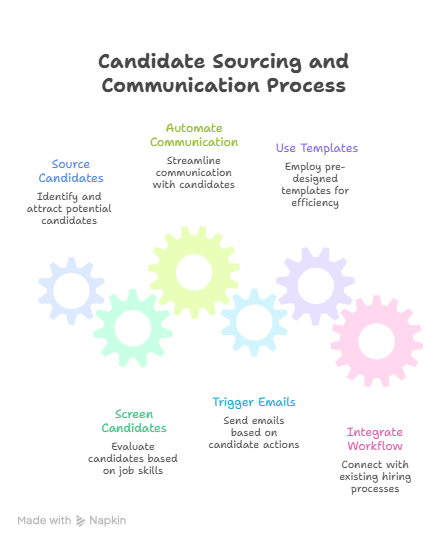
1. Sourcing the Right Candidates
Before emails even come into play, the quality of your communication depends on who you’re reaching out to.
Leelu.ai helps you start strong by sourcing candidates that actually match your job requirements.
It scans across multiple platforms and brings relevant profiles into one place, so you’re not wasting effort on unqualified outreach.
This means your automated emails go to the right candidates from the beginning, improving response rates and overall efficiency.
2. Screening Candidates Based on Job Skills
Once candidates enter your pipeline, the next challenge is figuring out who to move forward with.
Leelu.ai uses AI-based screening to evaluate candidates based on job-specific skills and criteria.
Instead of manually reviewing every profile, the system helps you prioritize the best matches quickly.
This ensures that your automated communication stays relevant, because candidates are progressing based on actual fit, not guesswork.
3. Automates Candidate Communication at Every Stage
Managing communication across stages is where most of the manual effort usually goes.
Leelu.ai automates this end-to-end, so candidates receive the right emails at the right time without constant input from your side.
From application acknowledgment to interview updates, everything is handled within a single workflow.
This keeps your hiring process moving while maintaining a consistent candidate experience.
4. Smart Email Triggers Based on Candidate Actions
Automation becomes powerful when it reacts to real candidate behavior, not just static timelines.
Leelu.ai allows you to set up smart triggers based on actions like applying, responding, or moving to a new stage.
This means emails are sent when they’re actually relevant, not just scheduled blindly.
As a result, your communication feels timely and contextual, which increases engagement.
5. Built-In Templates for Faster Setup
Creating emails from scratch can slow down your automation setup.
Leelu.ai provides ready-to-use templates that you can quickly customize based on your roles and hiring process.
These templates are designed to be clear, professional, and easy to personalize.
This helps you launch your automation faster without compromising on quality or consistency.
6. Seamless Integration with Your Hiring Workflow
One of the biggest challenges with automation is making sure it works with your existing tools.
Leelu.ai integrates seamlessly with your hiring workflow, including ATS systems and other platforms you already use.
This ensures that your data stays synced and your automation runs smoothly without extra manual work.
Instead of juggling multiple tools, you get a unified system where sourcing, screening, and communication all work together.
Best Practices for Recruiting Email Automation
At this point, you know how to set up recruiting email automation and where it fits in your workflow.
But how you use it makes all the difference, because poor automation can feel robotic and harm your candidate experience.
These best practices will help you keep your communication effective, human, and aligned with your hiring goals.
1. Keep Emails Short and Clear
When candidates receive an email, they shouldn’t have to spend time figuring out what it means.
Long, cluttered messages often get ignored or misunderstood.
Focus on keeping your emails simple, direct, and easy to scan so candidates can quickly understand what’s expected from them.
A clear structure with a single purpose per email works much better than trying to communicate everything at once.
2. Personalize Without Overcomplicating
Personalization improves engagement, but it doesn’t mean rewriting every email manually.
The goal is to make candidates feel addressed, not overwhelmed with overly complex messaging.
Use simple personalization elements like:
- Candidate name
- Role they applied for
- Relevant context about the stage
This keeps your emails relevant while still allowing you to scale your communication efficiently.
3. Avoid Over-Automation
Automation is powerful, but using it everywhere can backfire.
Not every interaction should be automated, especially when decisions or conversations require human judgment.
Be intentional about where automation adds value and where a personal touch matters more.
This balance ensures your process stays efficient without losing authenticity.
4. Set Clear Human Handoff Points
At certain stages, candidates expect to interact with a real person.
If automation continues for too long, it can create a disconnect and reduce trust.
Define clear points in your workflow where human involvement takes over, such as:
- Final interview stages
- Offer discussions
- Complex candidate queries
This ensures candidates feel supported when it matters most.
5. Maintain Brand Voice Consistency
Every email you send reflects your company’s voice and culture.
If your tone keeps changing across emails, it creates an inconsistent experience for candidates.
Make sure your templates follow a consistent style in terms of tone, language, and structure.
This helps you build a strong and recognizable employer brand while keeping communication professional and cohesive.
How to Measure Success of Email Automation
Once your recruiting email automation is live, the next question is simple — is it actually working?
Because automation is not just about saving time, it’s about improving outcomes across your hiring process.
To understand that, you need to track the right metrics.
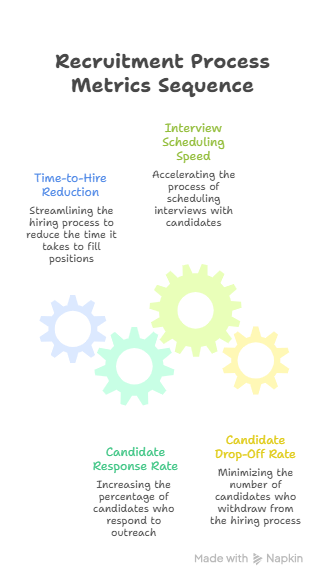
1. Time-to-Hire Reduction
One of the clearest indicators of success is how quickly you’re able to move candidates from application to offer.
If your automation is working well, you should see fewer delays between stages.
This happens because communication is instant, follow-ups are consistent, and scheduling becomes faster.
Compare your average time-to-hire before and after implementing automation to see the real impact.
2. Candidate Response Rate
Automation helps you reach candidates faster, but engagement is what truly matters.
Your response rate shows how many candidates are actually replying to your emails.
If your emails are clear, relevant, and timely, this number should improve.
Higher response rates usually indicate that your messaging and timing are aligned with candidate expectations.
3. Interview Scheduling Speed
Scheduling is often one of the biggest bottlenecks in recruitment.
With automation in place, this process should become significantly faster and smoother.
Track how long it takes to move from shortlist to scheduled interview.
If candidates are booking slots quickly and fewer reminders are needed, your automation is doing its job well.
4. Candidate Drop-Off Rate
Drop-offs happen when candidates lose interest or stop responding during the process.
Poor communication is one of the biggest reasons behind this.
With recruiting email automation, you should see a noticeable reduction in drop-offs.
Monitor how many candidates exit at each stage and identify if better communication is helping retain them longer.
When you track these metrics together, you get a clear picture of how your automation is performing.
And more importantly, where you can refine it to make your hiring process even stronger.
Conclusion
Recruiting email automation is no longer just a nice-to-have, it’s essential if you want to hire faster without overwhelming your team.
By automating repetitive communication, you create a smoother experience for candidates while freeing up time to focus on better hiring decisions.
When set up correctly, it helps you move faster, stay consistent, and reduce drop-offs across every stage.
Start small, refine your workflows, and gradually optimize based on performance, and you’ll see a noticeable improvement in both speed and quality of hiring.
Frequently Asked Questions
1. How does email automation improve the hiring process?
It speeds up communication, reduces manual effort, and ensures candidates receive timely updates at every stage.
2. What types of recruiting emails can be automated?
You can automate outreach, application confirmations, screening emails, interview invites, follow-ups, rejections, and offer emails.
3. Is email automation suitable for small businesses?
Yes, it helps small teams save time, stay organized, and manage hiring efficiently without needing a large recruiting team.
4. How do you personalize automated recruiting emails?
You can add candidate details like name, role, skills, or past interactions to make emails feel relevant and human.
5. What tools are best for recruiting email automation?
Tools that combine sourcing, tracking, and automation in one place work best, especially those that integrate with your existing hiring workflow.


