
Recruiting can feel like a job where the work never really ends.
One minute, you are waiting for a hiring manager to finalize a job description. Next, you are searching for candidates, writing outreach messages, preparing interview questions, following up with applicants, and trying to keep everyone aligned.
That is where ChatGPT can become useful.
You can use ChatGPT in recruitment to speed up repetitive work, organize information, generate ideas, and create better first drafts. But the real value comes when you know where AI helps and where your recruiting judgment still matters most.
AI is already becoming part of the recruitment workflow. BCG reported in 2025 that 70% of organizations experimenting with AI or generative AI were doing so within HR, with talent acquisition being the top HR use case.
Among those organizations, 92% said they were already seeing benefits, while more than 10% reported productivity gains above 30%.
So, how can you actually use ChatGPT for recruitment without turning your hiring process into an automated black box?
In this guide, you will learn how to use ChatGPT to recruitment.
What Can ChatGPT Do in Recruitment?
Before you start using ChatGPT for recruitment, it helps to understand what kind of work it is actually good at.
Think about the parts of your day that involve a blank page, repetitive writing, organizing scattered information, or finding different ways to communicate the same idea.
Those are often good starting points for ChatGPT.
Where ChatGPT can help
You can use it for tasks such as:
- Drafting job descriptions
- Rewriting recruitment content
- Brainstorming alternative job titles
- Creating Boolean search ideas
- Preparing interview questions
- Drafting candidate communication
- Summarizing notes
- Structuring hiring information
- Creating recruitment content
- Generating variations of messages
The important distinction is that ChatGPT should support your recruitment process rather than silently take control of it.
A recruiter can use AI to create a first draft. The recruiter still needs to decide whether that draft is accurate, relevant, fair, and appropriate for the role.
Think of ChatGPT as the first draft, not the final decision
This distinction becomes important as you move deeper into the recruitment process.
11 Ways Recruiters Can Use ChatGPT in Recruitment
ChatGPT becomes much more useful when you stop thinking about it as a chatbot and start thinking about it as an assistant sitting beside you during the hiring process.
Here are 11 practical ways you can use it.
1. Create a First Draft of a Job Description
A job description often becomes the starting point for an entire recruitment campaign.
But getting that first version written can take longer than it should, especially when the hiring manager gives you nothing more than a role title and a handful of responsibilities.
ChatGPT can help turn those rough inputs into a structured first draft.
You can use it to organize:
- Role responsibilities
- Required skills
- Preferred qualifications
- Experience requirements
- Team information
- Role expectations
- Candidate-facing language
A simple recruitment scenario
Imagine a hiring manager sends you this:
“Need a senior product manager with B2B SaaS experience, good stakeholder management, and experience launching products.”
That is useful information, but it is not yet a complete job description.
ChatGPT can help you turn those points into a more structured draft that you can then review with the hiring manager.
The important part is what happens after the draft.
You should check whether the requirements genuinely reflect the role, whether unnecessary qualifications have been added, and whether the language accurately represents the opportunity.
2. Improve an Existing Job Description
You do not always need to create a job description from scratch.
Sometimes the bigger problem is that the existing one is too long, unclear, repetitive, or packed with requirements that do not actually help you identify the right candidate.
This is another area where ChatGPT can help.
You can use it to review a job description for:
- Repetitive language
- Unclear responsibilities
- Long or complicated sentences
- Missing information
- Inconsistent terminology
- Requirements that could be simplified
- Language that may unnecessarily narrow the candidate pool
This gives you a useful two-stage workflow:
Draft → Review → Refine
Why this matters for recruiters
A better job description is not just easier to read.
It can also make it easier for you to understand exactly what you are looking for before you start sourcing.
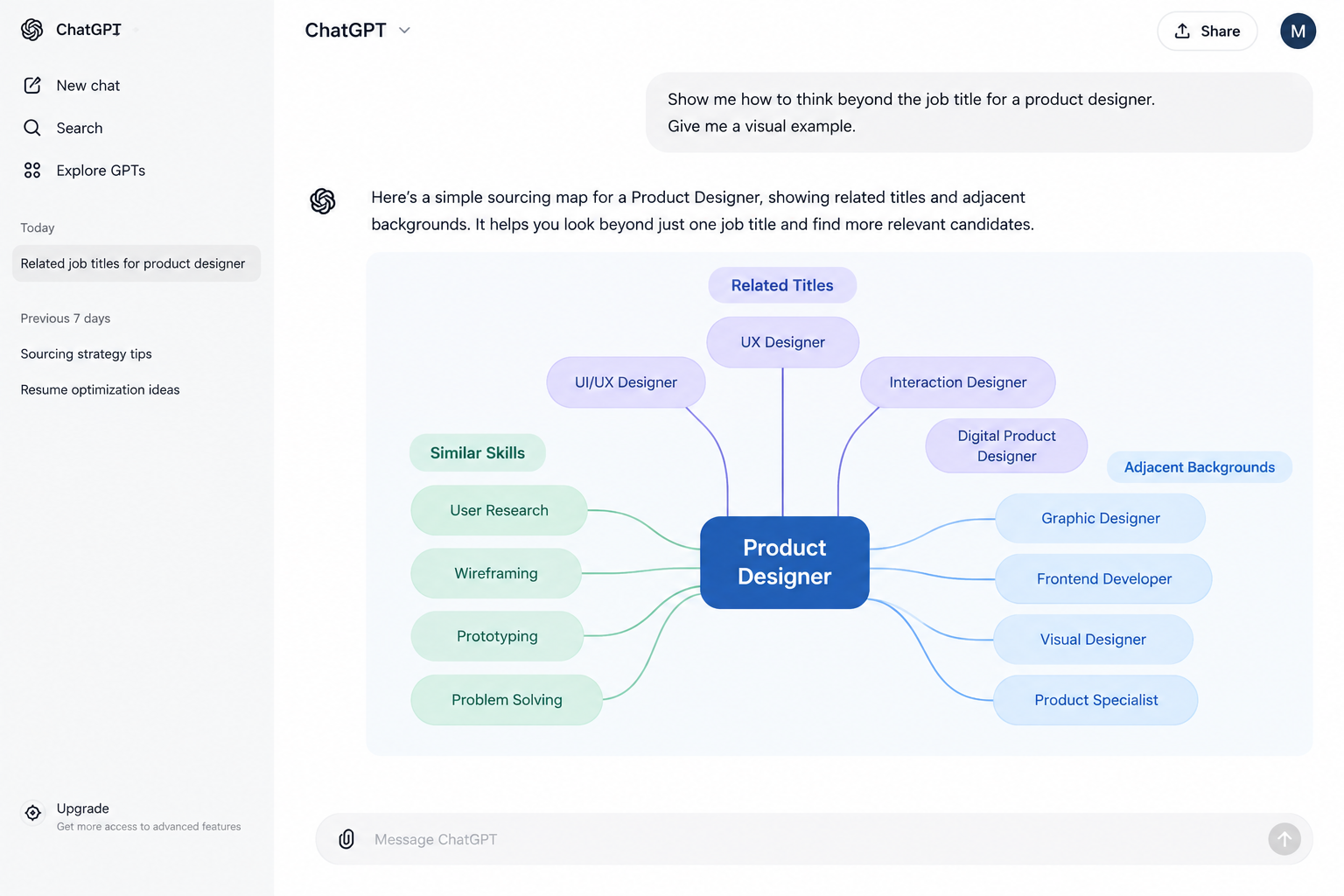
3. Find Alternative Job Titles for Sourcing
One of the easiest ways to make sourcing harder is to search for only one job title.
Companies rarely use titles consistently.
One organization might hire a Customer Success Manager.
Another might use Client Success Manager.
A third might call a similar role Customer Experience Manager.
The underlying skills can overlap even when the titles do not.
ChatGPT can help you brainstorm related titles, terminology, and role variations before you start your search.
Think beyond the job title
Instead of:
One role → One title
Think:
One role → Multiple titles → Related skills → Adjacent backgrounds
That small shift can help you build a broader sourcing strategy.
4. Build and Refine Boolean Searches
Once you know which titles and skills you want to search for, the next challenge is turning them into an effective Boolean string.
This is another area where ChatGPT can save you from staring at a blank search box.
You can use it to help structure combinations of:
- Job titles
- Skills
- Technologies
- Certifications
- Industries
- Companies
- Locations
- Exclusion terms
Boolean search works by combining terms with operators such as AND, OR, and NOT to narrow or expand results. Recruiters commonly use Boolean searches across platforms such as LinkedIn, Indeed, Google, and ATS systems.
But do not copy and paste blindly
A Boolean string that looks perfect on screen can still produce poor results.
The real workflow should be:
Create → Search → Review results → Refine → Search again
That final step matters.
If the search returns too many irrelevant profiles, tighten it.
If it returns too few candidates, broaden the titles, skills, or experience terms.
5. Personalize Candidate Outreach
Candidate outreach is one of the areas where ChatGPT can save writing time.
You can use it to create a starting point for:
- Initial outreach
- LinkedIn messages
- Follow-ups
- Re-engagement messages
- Interview invitations
- Candidate updates
But there is a catch.
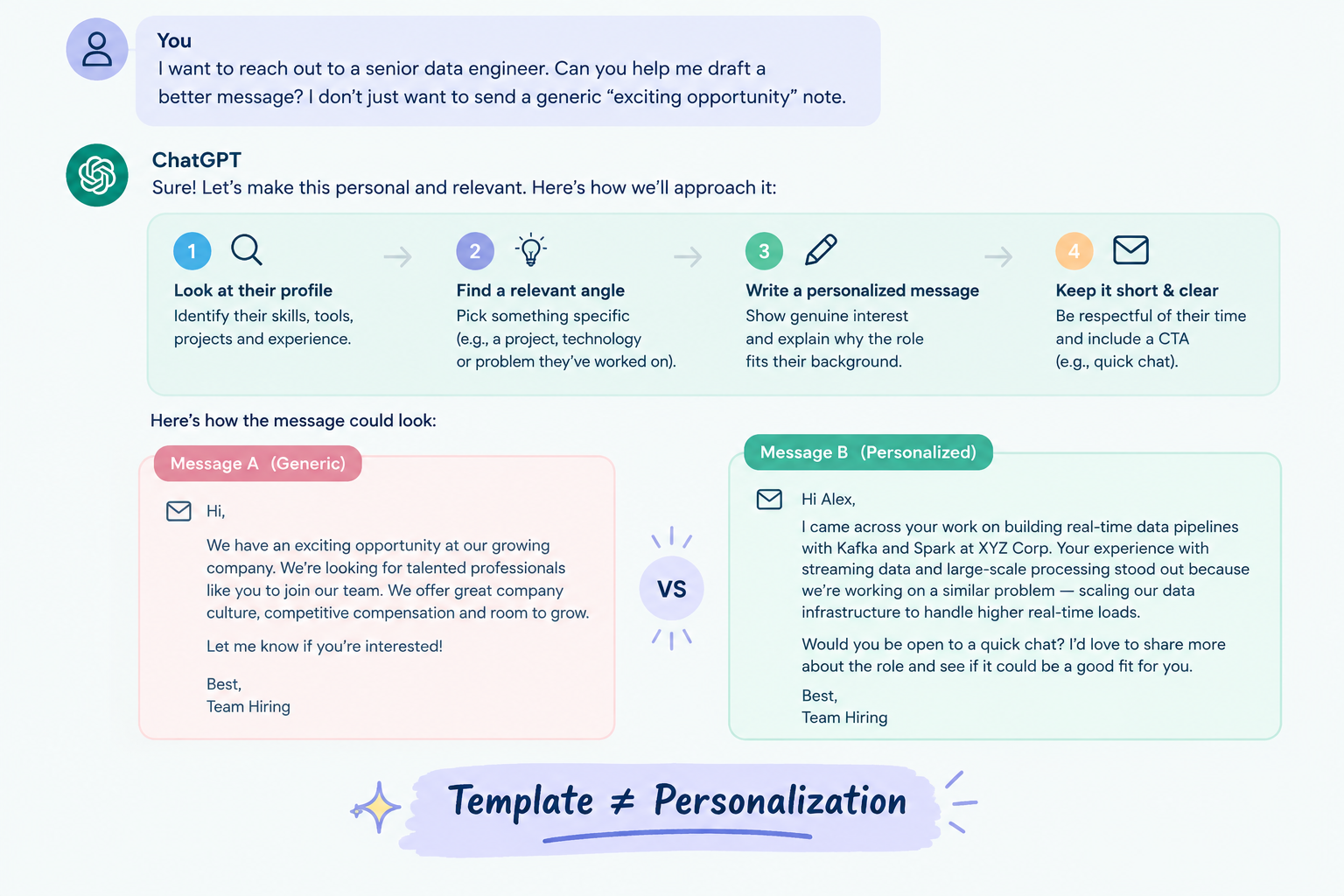
Candidates can tell when a message feels like it was written for everyone.
That is why you should not treat AI-generated outreach as a finished message.
The better workflow
AI draft → Candidate research → Personal detail → Recruiter review → Send
Imagine you are contacting a senior data engineer.
A generic message might talk about an “exciting opportunity” and “great company culture.”
A stronger message could acknowledge a specific technology they have worked with, a relevant project, or the type of problem the role involves.
ChatGPT can help you structure the message.
You provide the reason it should matter to that particular candidate.
6. Prepare Role-Specific Interview Questions
Recruiters often need to prepare interviews across roles they do not know deeply.
That can be difficult when you are hiring for a technical, specialized, or highly specific position.
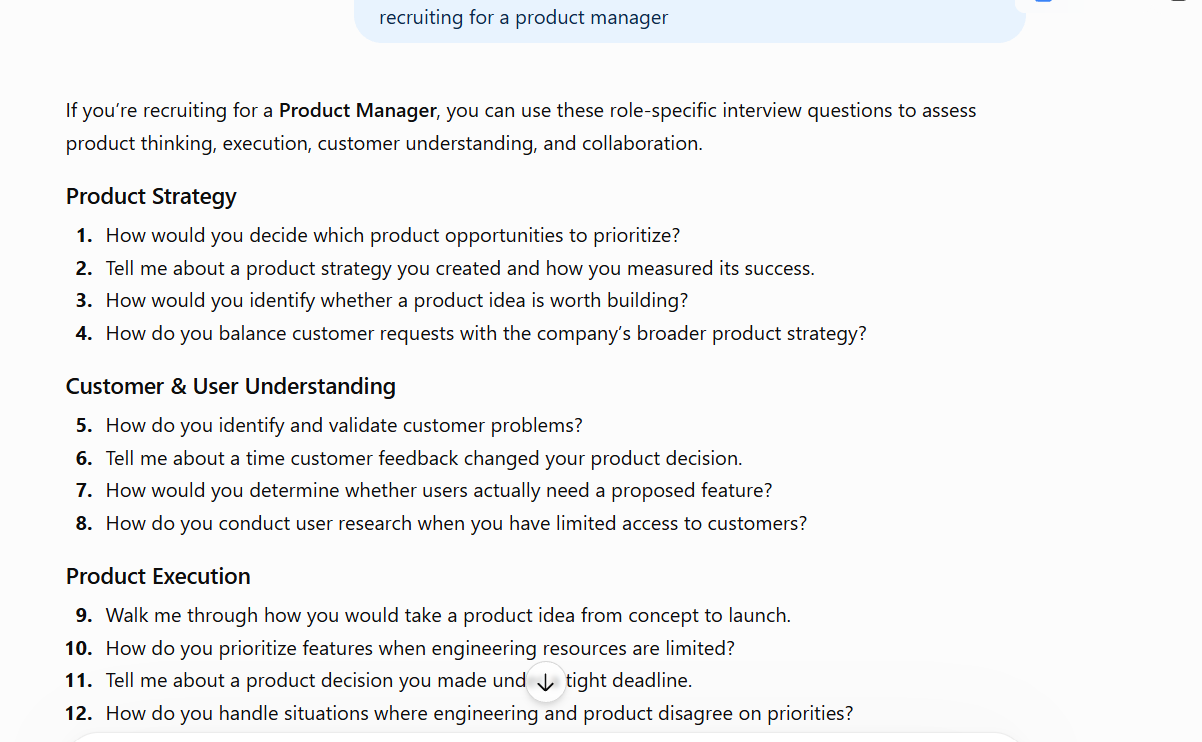
ChatGPT can help you build an initial question bank based on the competencies you need to assess.
You can use it to organize questions around:
- Technical skills
- Behavioral competencies
- Problem-solving
- Leadership
- Communication
- Collaboration
- Role-specific scenarios
For instance, if you are recruiting for a product manager, you could organize your interview around:
Product strategy → Customer understanding → Prioritization → Stakeholder management → Execution
This gives you a starting framework rather than a random list of questions.
The recruiter still owns the quality bar
ChatGPT can suggest questions.
It cannot know whether a particular question actually reflects what success looks like in your organization.
That is where your hiring context matters.
7. Build Interview Guides and Evaluation Criteria
Creating interview questions is only half the job.
You also need to understand what you are trying to learn from each question.
ChatGPT can help you turn a broad competency into a more structured interview guide.
For instance:
This can make interviews more consistent across interviewers.
AIHR identifies evaluation criteria and scorecard creation as another potential ChatGPT recruiting use case.
The important distinction
AI can help you structure the evaluation framework.
The hiring team should still evaluate the candidate based on actual evidence.
That keeps AI in a supporting role rather than turning it into an invisible hiring decision-maker.
8. Summarize Interview Feedback
Recruitment teams can collect a surprising amount of information from a single interview process.
You may have:
- Recruiter notes
- Hiring-manager feedback
- Technical interview notes
- Panel feedback
- Candidate questions
- Interview scores
When all of that arrives in different formats, turning it into a clean summary takes time.
ChatGPT can help organize the information into common categories.
For example:
Strengths → Concerns → Evidence → Open questions → Follow-up areas
The benefit is not that AI decides whether the candidate should be hired.
The benefit is that you have a clearer document to review.
Use the original notes as your source of truth
AI-generated summaries can miss context or misunderstand information.
So the safer workflow is:
Interview notes → AI summary → Recruiter verification → Final review
This is especially important when the information affects a hiring decision.
AIHR also recommends human review of AI-generated recruitment outputs rather than using them without oversight.
Suggested Reading:
Employee Onboarding Checklist: Ultimate Guide for HR9. Write Better Candidate Follow-Ups
Recruitment communication does not stop after the interview.
Candidates may need updates while you are waiting for feedback, coordinating interviews, or making decisions.
You can use ChatGPT to help draft:
- Interview follow-ups
- Status updates
- Scheduling messages
- Re-engagement messages
- Rejection communication
- Candidate FAQs
This can be particularly useful when recruiters are managing multiple roles simultaneously.
But keep the human element
A candidate rejection should not sound like a customer-support ticket.
An update should not sound like it was generated for 500 people.
Use ChatGPT to reduce the writing workload, then add the context and empathy that make the communication feel human.
Think of it this way:
AI handles the blank page. You handle the relationship.
10. Turn Messy Recruitment Notes Into Clear Information
Recruitment generates information everywhere.
You may have notes from a hiring-manager meeting in one document, candidate requirements in another, and interview feedback sitting in a spreadsheet.
ChatGPT can help organize this information into a structure that is easier to review.
You can use it to turn unstructured notes into:
- Action items
- Requirement lists
- Candidate summaries
- Interview themes
- Hiring-manager questions
- Recruitment checklists
- Meeting summaries
This can be particularly helpful when you are working across several roles.
A simple example
Before:
“Need someone senior. Must have SaaS. Maybe 6+ years. Strong stakeholder skills. Technical enough to work with engineering. Prefer someone from a startup.”
After organizing:
Must-have
- SaaS experience
- Senior-level experience
- Strong stakeholder management
Preferred
- Startup experience
- Technical collaboration with engineering
Needs clarification
- Exact years of experience
- Technical depth required
The AI has not made the hiring criteria.
It has simply helped you see the information more clearly.
11. Create a Repeatable Recruitment Workflow
This is where individual ChatGPT use cases start becoming a bigger recruitment system.
Instead of using ChatGPT randomly whenever you remember it exists, identify the repetitive parts of your recruitment workflow where AI can consistently help.
You might have a process like:
1. Define the role
↓
2. Create the job description
↓
3. Build the sourcing strategy
↓
4. Find relevant candidates
↓
5. Personalize outreach
↓
6. Prepare interviews
↓
7. Organize feedback
↓
8. Communicate with candidates
↓
9. Review the hiring funnel
ChatGPT can support several of the content-heavy and organizational steps.
The key is to create a consistent process instead of treating AI as a collection of random shortcuts.
What Should Recruiters Not Use ChatGPT For?
Knowing where not to use ChatGPT is just as important as knowing where to use it.
The goal is not to automate every part of recruitment.
It is to remove repetitive work while keeping important decisions accountable to people.
Don't hand over final hiring decisions
ChatGPT can help organize information, create evaluation frameworks, and summarize notes.
It should not become an invisible decision-maker that determines who gets hired.
Recruiters and hiring teams need to review the underlying evidence and make the final decision.
Don't assume every output is accurate
ChatGPT can produce confident-sounding information that still needs verification.
Review:
- Job requirements
- Candidate-related information
- Technical terminology
- Company information
- Recruitment policies
- Legal or compliance-related content
AIHR specifically recommends reviewing AI outputs for accuracy and organizational or legal requirements before using them.
Don't put sensitive candidate information into unapproved tools
Recruitment involves personal and potentially sensitive information.
Before using candidate information with any AI tool, understand your organization's privacy, security, and data-handling requirements.
A good rule is simple:
If you would not casually paste the information into another external tool, do not assume you should paste it into an AI tool either.
How Much Time Can AI Actually Save Recruiters?
It is tempting to put one big number on the value of ChatGPT.
But recruitment is too varied for a single “ChatGPT saves X hours per recruiter” claim to tell the whole story.
The broader AI data is still useful.
BCG's 2024 survey of chief human resources officers found that among organizations experimenting with AI or generative AI, 92% reported seeing benefits, while more than 10% reported productivity gains above 30%. Talent acquisition was also identified as the top HR use case.
That points to a more useful way of thinking about AI productivity.
The value often comes from removing small amounts of repetitive work across dozens of recruitment activities.
Saving a few minutes on a job description.
Reducing the time needed to structure an interview guide.
Getting a first draft of an outreach message.
Turning scattered notes into a readable summary.
Individually, those improvements may look small.
Across hundreds of hiring activities, they can add up.
The productivity equation
Less repetitive work
Faster first drafts
Better organization
=
More recruiter capacity for candidates and hiring managers
That is where ChatGPT can become genuinely useful in recruitment.
A Simple 5-Step Framework for Using ChatGPT in Recruitment
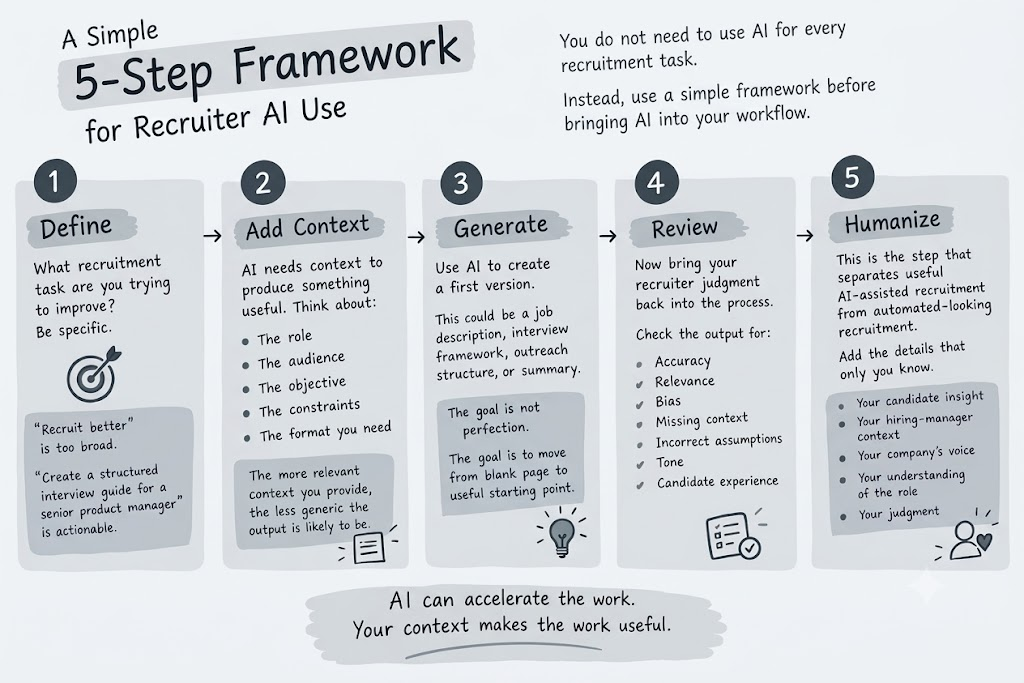
You do not need to use AI for every recruitment task.
Instead, use a simple framework before bringing ChatGPT into your workflow.
1. Define
What recruitment task are you trying to improve?
Be specific.
“Recruit better” is too broad.
“Create a structured interview guide for a senior product manager” is actionable.
2. Add Context
AI needs context to produce something useful.
Think about:
- The role
- The audience
- The objective
- The constraints
- The format you need
The more relevant context you provide, the less generic the output is likely to be.
3. Generate
Use ChatGPT to create the first version.
This could be a job description, interview framework, outreach structure, or summary.
The goal is not perfection.
The goal is to move from a blank page to a useful starting point.
4. Review
Now bring your recruiter's judgment back into the process.
Check the output for:
- Accuracy
- Relevance
- Bias
- Missing context
- Incorrect assumptions
- Tone
- Candidate experience
5. Humanize
This is the step that separates useful AI-assisted recruitment from automated-looking recruitment.
Add the details that only you know.
Your candidate insight.
Your hiring-manager context.
Your company's voice.
Your understanding of the role.
Your judgment.
AI can accelerate the work. Your context makes the work useful.
Before & After ChatGPT
By now, you can see that ChatGPT is not limited to one part of recruiting.
You can use it before sourcing, during candidate engagement, throughout interview preparation, and when organizing feedback.
Think about the workflow visually:
Before ChatGPT
Blank page
→ Research
→ Draft
→ Rewrite
→ Search strategy
→ Outreach
→ Interview preparation
→ Notes
→ Follow-up
→ Repeat
After ChatGPT
Recruiter context
→ AI-assisted first draft
→ Recruiter review
→ Candidate interaction
→ AI-assisted organization
→ Human decision
The difference is not that AI suddenly does recruitment for you.
The difference is that you spend less time starting from scratch.
And when you want to move beyond AI-assisted drafting into an end-to-end recruiting workflow, platforms such as Leelu AI can help bring sourcing, screening, outreach, and interview scheduling into one recruiting workflow.
Final Thoughts
ChatGPT can take a lot of the repetitive work out of recruitment.
It can help you move faster from a blank page to a job description, from a role requirement to a sourcing strategy, and from scattered interview notes to something your team can actually review.
But the goal is not to make recruitment less human.
The goal is to give you more time for the parts of recruiting that should stay human: understanding candidates, advising hiring managers, building relationships, and making thoughtful hiring decisions.
Frequently Asked Questions
How do recruiters get better results from ChatGPT?
Give ChatGPT enough context, define the exact task, and specify how you want the output structured. It also helps to refine the prompt after reviewing the first response instead of expecting the first output to be final.
What recruitment tasks are easiest to start with using ChatGPT?
Writing, brainstorming, summarizing, and organizing tasks are usually simple starting points. For example, recruiters can use ChatGPT to turn rough hiring-manager notes into requirements or create a first draft of an interview guide.
How should recruiters verify ChatGPT's recruitment outputs?
Compare important claims and recommendations against the original job requirements, candidate information, company policies, and other trusted sources. Treat AI output as a draft or working aid rather than automatically verified information.
What is the difference between using ChatGPT and using AI recruiting software?
ChatGPT is a general-purpose AI assistant that can support individual recruitment tasks. AI recruiting software is designed around specific hiring workflows and may connect functions such as sourcing, screening, outreach, scheduling, or candidate management in one system.
How can recruiters use ChatGPT without losing the human side of hiring?
Keep AI focused on repetitive or preparatory work while recruiters remain responsible for candidate conversations, relationship building, contextual judgment, and final hiring decisions. This lets AI reduce administrative effort without removing the human element from recruitment.


