
Recruiting can quickly turn into a cycle of repetitive work.
You post a job, search through profiles, review resumes, send outreach, follow up with candidates, coordinate interviews, and update your ATS. When several roles are open at once, these small tasks can consume a large part of your recruiting team's time.
And the problem is not going away. SHRM's 2026 recruiting benchmark found that more than 2 in 3 organizations reported difficulty hiring for open positions, while the median time-to-fill for nonexecutive roles was 39 calendar days.
This is where an automated recruiting process can help.
Instead of making recruiters handle every repetitive step manually, you can use automation to source candidates, screen profiles, manage outreach, schedule interviews, and keep recruiting data updated.
In this guide, you'll learn how to:
- Identify which recruiting tasks you should automate
- Build an automated recruitment process step by step
- Use AI for sourcing, screening, outreach, and scheduling
- Avoid common mistakes when automating recruitment processes
- Measure whether your automation is actually improving hiring
What Does It Mean to Automate the Recruiting Process?
To automate the recruiting process means using software or AI to handle repetitive parts of your hiring workflow with less manual intervention.
Think about what happens after you open a new role.
Without automation, you might search several platforms, collect candidate information, review resumes, send individual messages, wait for replies, coordinate interview times, and update your ATS.
With automation, many of those steps can happen through a connected workflow.
Manual workflow:
Job opening → Search candidates → Review profiles → Send outreach → Follow up → Schedule interview → Update ATS
Automated workflow:
Job requirements → AI sourcing → AI screening → Personalized outreach → Automated follow-ups → Smart scheduling → ATS sync
The goal is not to remove recruiters from the process.
It is to remove the repetitive work that prevents recruiters from spending more time on candidate relationships, hiring decisions, and strategic work.
LinkedIn's 2025 Future of Recruiting research found that recruiters using generative AI reported an average 20% reduction in their workload, while 73% of talent acquisition professionals surveyed agreed that AI will change how companies hire.
So, the opportunity is less about replacing recruiters and more about giving them more time to focus where human judgment matters.
How to Automate Your Recruiting Process in 9 Steps
Now that you know what can be automated, you can start building the workflow.
The easiest approach is to automate the recruiting process in stages rather than trying to change everything at once.
Step 1: Define Hiring Requirements and Candidate Criteria
Start with the role itself.
Before you automate anything, clearly define what you are looking for.
Your requirements might include:
- Job title
- Required skills
- Preferred skills
- Years of experience
- Location
- Education
- Industry experience
- Salary range
- Employment type
You should also separate must-have requirements from nice-to-have requirements.
For example, suppose you are hiring a software engineer.
A must-have requirement might be three years of Python experience, while experience with a specific cloud platform could be preferred.
This distinction gives your automation system better criteria for sourcing and screening candidates.
Step 2: Create and Optimize the Job Description With AI
Once the requirements are clear, create your job description.
AI can help you generate a first version quickly, but you should still review it before publishing.
Look for three things:
Clarity: Can candidates quickly understand the role?
Relevance: Does the description focus on the skills actually needed?
Accuracy: Does it reflect what the person will really do?
A good automated workflow should save you writing time without removing human review.
Step 3: Automate Candidate Sourcing With AI Talent Search
Once the job is live, sourcing becomes the next major opportunity.
Instead of manually searching several platforms, set your sourcing criteria and let the system identify candidates who match them.
For instance, if you're hiring a sales development representative, you might specify:
2+ years of B2B sales experience, SaaS background, experience with outbound prospecting, and based in a particular region.
The sourcing system can use those criteria to identify relevant profiles.
This matters because sourcing can become a major time drain. Workable reported in 2026 that hiring teams spend around 40% of their recruiting time sourcing candidates.
For an automated recruiting process, sourcing is therefore one of the first areas worth addressing.
Step 4: Screen and Rank Candidates With AI Matching
Finding candidates is only half the problem.
You still need to determine which candidates are worth contacting.
AI screening can parse resumes and profiles, compare them with the job requirements, and prioritize candidates based on fit.
For example:
The point is not that the AI should automatically reject Candidate C.
Instead, it gives the recruiter a structured starting point for review.
That distinction is important because hiring decisions often involve context that automated systems cannot fully understand.
Step 5: Automate Personalized Candidate Outreach
Once you have your shortlist, you can automate outreach.
Instead of sending the same generic message to everyone, use candidate information to make each message more relevant.
For example, instead of:
Hi, we have an exciting opportunity at our company. Would you be interested?
You could write:
Hi Sarah, I noticed your experience building B2B sales teams in SaaS companies. We're currently hiring for a sales leadership role where that experience could be particularly relevant.
The system can generate or personalize the initial message while your recruiting team controls the messaging strategy.
You can also create follow-up sequences.
For example:
Day 1: Initial outreach
Day 4: Follow-up
Day 8: Final follow-up
This means recruiters do not have to remember which candidates need another message.
Step 6: Automate Candidate Conversations and Follow-Ups
Not every candidate responds with a simple yes or no.
They may ask:
- What is the salary range?
- Is the role remote?
- What does the interview process look like?
- When can I speak with the hiring manager?
AI can handle simple, predictable questions and keep candidates engaged.
More complex conversations can then be handed over to a recruiter.
This creates a useful balance:
AI handles repetitive communication.
Recruiters handle conversations that require judgment.
This approach also supports always-on recruiting because candidates can receive responses and follow-ups outside traditional working hours.
Step 7: Automate Interview Scheduling
Once a candidate is interested, scheduling should not become another bottleneck.
Connect your recruiting system to the relevant calendars and define available interview slots.
The workflow can then look like this:
Candidate interested → Available slots identified → Candidate selects time → Calendar invitation sent → ATS updated
Instead of several emails going back and forth, the process can happen automatically.
This is a small change, but it can remove a surprising amount of administrative work when you're hiring at scale.
Step 8: Sync Recruiting Data With Your ATS
Your ATS should remain the central source of candidate information.
When your recruiting tools are disconnected, recruiters may need to manually update candidate stages, copy contact information, or record communication history.
That creates unnecessary work and increases the risk of missing information.
An automated workflow should keep the ATS updated as candidates move through the pipeline.
For example:
Sourced → Contacted → Responded → Screening → Interview → Offer → Hired
Each status change should trigger the relevant action wherever possible.
Step 9: Track and Optimize Recruiting Funnel Performance
Automation only works if you measure its impact.
Track the parts of the recruiting funnel that matter most to your business.
Some useful metrics include:
- Time to fill
- Time to shortlist
- Time to interview
- Outreach response rate
- Interview conversion rate
- Offer acceptance rate
- Source of hire
- Quality of hire
- Recruiter time spent per role
This is where your recruiting data becomes useful.
Suppose your automated sourcing produces 500 candidates but only 2% respond to outreach.
Your problem may not be sourcing.
It could be your targeting or messaging.
Automation gives you the data to identify that bottleneck instead of guessing.
Suggested Reading:
30 Exit Interview Questions Template for Better HR InsightsWhat Does an Automated Recruitment Process Look Like in Practice?
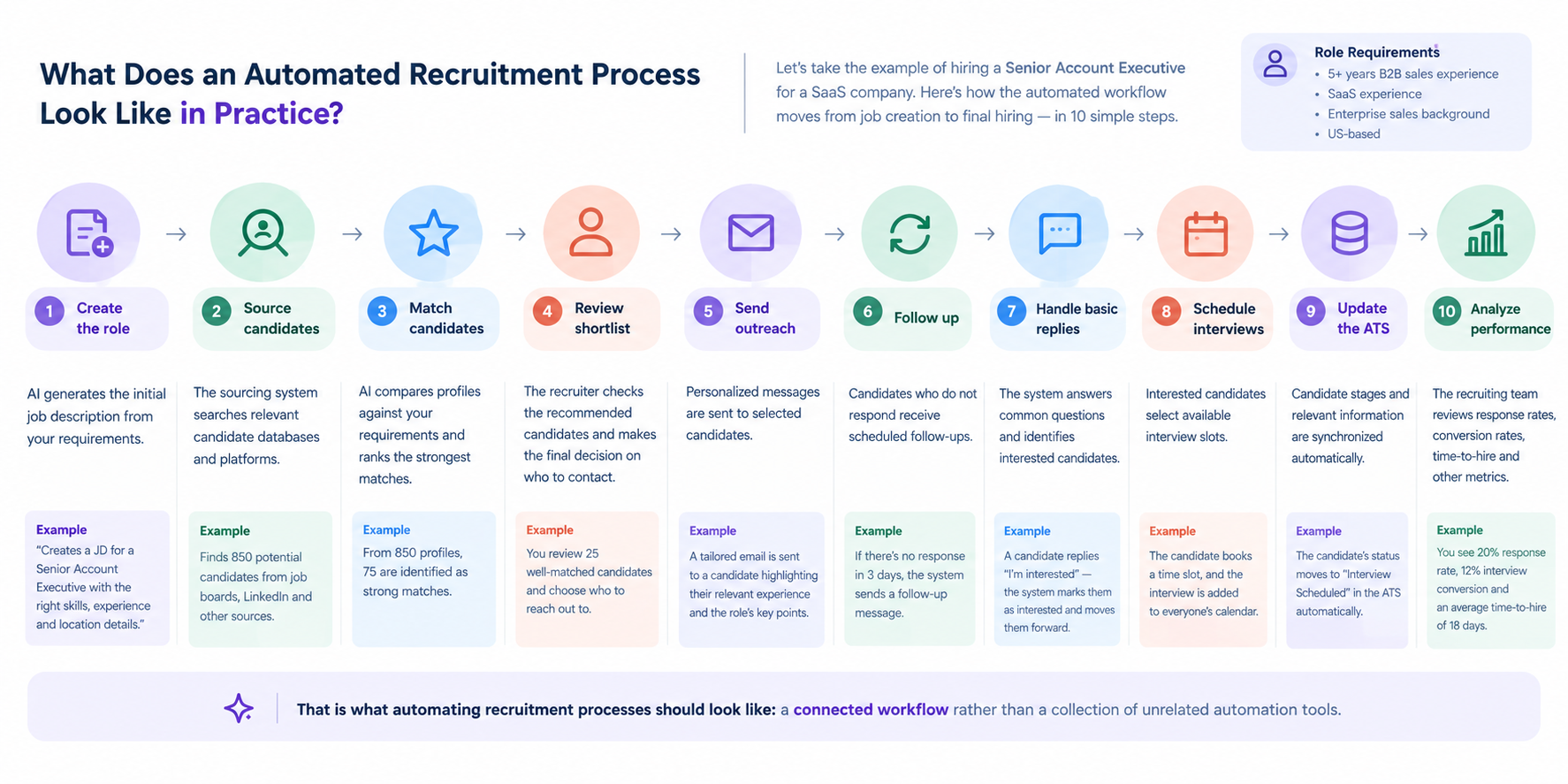
Let's put all the steps together.
Imagine you're hiring a senior account executive.
You start by defining the role requirements:
- 5+ years of B2B sales experience
- SaaS experience
- Enterprise sales background
- Experience exceeding sales targets
- Specific geographic requirement
Your automated workflow could then look like this:
1. Create the role
AI generates the initial job description from your requirements.
2. Source candidates
The sourcing system searches relevant candidate databases and platforms.
3. Match candidates
AI compares profiles against your requirements and ranks the strongest matches.
4. Review the shortlist
The recruiter checks the recommended candidates and makes the final decision on who to contact.
5. Send outreach
Personalized messages are sent to selected candidates.
6. Follow up
Candidates who do not respond receive scheduled follow-ups.
7. Handle basic replies
The system answers common questions and identifies interested candidates.
8. Schedule interviews
Interested candidates select available interview slots.
9. Update the ATS
Candidate stages and relevant information are synchronized automatically.
10. Analyze performance
The recruiting team reviews response rates, conversion rates, time-to-hire, and other metrics.
That is what automating recruitment processes should look like: a connected workflow rather than a collection of unrelated automation tools.
How to Measure an Automated Recruiting Process
Start with a baseline.
Record your current performance before introducing automation.
For example:
These numbers are illustrative, not industry benchmarks. The point is to compare your own recruiting process before and after automation.
You can also compare your results against external benchmarks.
SHRM's 2026 data puts median time-to-fill for nonexecutive positions at 39 calendar days, although actual performance varies considerably by role, organization, and hiring market.
The more important question is whether your own process is improving.
How to Start Automating Recruiting Without Overcomplicating It
You do not need to automate your entire hiring process on day one.
Start with the most repetitive bottleneck.
If sourcing consumes most of your team's time, start there.
If scheduling is slowing down interviews, automate scheduling first.
If recruiters spend hours screening resumes, start with candidate screening and matching.
A practical rollout can look like this:
Stage 1: Identify repetitive tasks
Stage 2: Automate sourcing and screening
Stage 3: Add outreach and follow-ups
Stage 4: Automate scheduling
Stage 5: Connect your ATS
Stage 6: Measure and optimize the workflow
This gradual approach makes it easier to see what is actually improving.
It also gives your recruiting team time to adapt instead of introducing several new systems at once.
Suggested Reading:
How to Implement AI Hiring Automation for Faster RecruitingHow Leelu Helps Automate Recruiting From End to End
Once you connect all these steps, recruiting automation becomes more useful when the tools work together instead of operating separately.
Leelu is positioned as an AI recruiting copilot that brings sourcing, screening, outreach, scheduling, and other recruiting workflows into one system.
Its documented workflow covers:
Create → Source → Aggregate → Screen → Engage → Converse → Schedule → Sync → Optimize
Source Candidates Across Multiple Platforms
Leelu's sourcing engine is positioned around searching 500M+ profiles across LinkedIn, Indeed, Monster, and ATS systems.
That means you can start with your hiring requirements and use AI to identify potential candidates across multiple sources rather than manually searching each platform.
Screen and Match Candidates
Leelu's resume parser and AI matching capabilities are designed to parse candidate information and rank profiles based on job fit.
The messaging documentation cites screening thousands of candidates in minutes and a stated 90% match accuracy for its AI matching algorithm.
These figures are product claims from Leelu's messaging documentation, so they should be treated as positioning claims rather than independent benchmarks.
Automate Outreach and Follow-Ups
After screening, Leelu can support personalized candidate outreach and automated replies.
Its product messaging describes personalized outreach across email and LinkedIn, followed by automated conversations and follow-ups.
This helps keep candidates moving through the pipeline without requiring recruiters to manually manage every follow-up.
Schedule Interviews Automatically
Once a candidate is ready for an interview, smart scheduling can handle calendar coordination.
Leelu's documented messaging positions scheduling at under one minute with calendar synchronization.
The practical benefit is simple: fewer scheduling emails and less recruiter coordination.
Keep Your ATS Updated
Finally, ATS integrations can connect the recruiting workflow back to your existing systems.
Leelu's documented integrations include systems such as Greenhouse, Lever, and Workday.
This helps create a more unified workflow instead of making recruiters move information between separate systems.
Common Recruiting Automation Mistakes to Avoid
Automating Every Recruiting Task at Once
Don't automate the entire hiring workflow immediately. Start with the repetitive tasks that consume the most recruiter time, then expand once you know the workflow is working.
Relying on AI to Make Final Hiring Decisions
AI can help rank candidates against defined criteria, but recruiters should remain responsible for final hiring decisions. Candidate context, transferable skills, career changes, and other factors may not be captured accurately by automated matching.
Sending Generic Automated Outreach
Automation should not mean sending identical messages to every candidate. Use relevant candidate information to personalize outreach while keeping the message concise and genuine.
Ignoring Email Deliverability
If you're automating candidate outreach through email, protect your sender reputation. Use verified addresses, appropriate sending volumes, authentication such as SPF/DKIM/DMARC, and clear opt-out handling where applicable.
Creating Too Many Follow-Ups
Automated sequences can become intrusive when they continue indefinitely. Define a clear stopping point when a candidate responds, declines, or asks not to be contacted.
Keeping Automation Disconnected From the ATS
If recruiters still need to manually copy candidate information between tools, you have only automated part of the workflow. Connect sourcing, outreach, scheduling, and candidate activity back to your ATS wherever possible.
Final Thoughts
The best reason to automate the recruiting process is not simply to use more technology.
It is to give recruiters more time to do the work that technology cannot replace.
Sourcing candidates, reviewing profiles, sending repetitive follow-ups, coordinating calendars, and updating systems can all consume valuable recruiting time.
Automation can take much of that repetitive work off your team's plate.
And the opportunity is becoming clearer as AI adoption grows. LinkedIn found that recruiters already using generative AI reported saving an average of 20% of their workweek, while Workable's survey of 950 hiring managers found that 89.6% said AI had sped up time-to-fill.
The key is to start with the right tasks.
Automate the repetitive work.
Keep humans involved where judgment matters.
Then measure the results and improve the workflow over time.
That is how an automated recruitment process becomes more than a collection of tools. It becomes a faster, more consistent way to hire.
Frequently Asked Questions
What is the biggest advantage of automating recruitment?
The biggest advantage is reducing the amount of manual work required to move candidates through the hiring funnel. Recruiters can spend less time searching databases, sending repetitive messages, and updating records and more time evaluating candidates and building relationships.
How does AI decide which candidates are a good match?
AI can compare candidate information such as skills, experience, job history, location, and other role requirements against the criteria defined by the recruiter. The results can then be ranked so recruiters can focus on the strongest potential matches first.
What happens when a candidate gives an unusual or complex reply?
The system can identify responses that fall outside predefined scenarios and route them to a recruiter. This creates a useful boundary: automation handles predictable interactions, while recruiters handle conversations that require judgment or context.
How Much Does Recruiting Automation Software Cost?
Costs vary depending on the recruiting automation software, number of users, candidate volume, integrations, and features. Some tools offer free or low-cost plans, while enterprise recruiting platforms may charge based on users, hiring volume, or annual contracts.
Compare pricing based on the specific workflows you want to automate rather than choosing solely on the subscription price.


